
DATA(lv_string) = REDUCE #( INIT str = || FOR line IN table_of_strings NEXT str = str && line ).
Tag: SAP
[CAP] Posting form data to a destination using executeHttpRequest
        const { executeHttpRequest } = require('@sap-cloud-sdk/http-client')
        const FormData = require('form-data')

        try {
            //Create payload
            const form = new FormData()
            form.append('file', fileContent, {
                contentType: 'application/pdf'
                filename: 'test.pdf'
            })

            //Create headers
            const headers = {
                ...form.getHeaders(),
                'Content-Length': form.getLengthSync(),
            }

            //Send to Destination
            const response = await executeHttpRequest(
                { destinationName: 'TESTINATION' },
                {
                    method: 'POST',
                    url: 'myApiPath',
                    headers: headers,
                    data: form,
                    responseType: 'arraybuffer' // if you need the response data as buffer to prevent UTF-8 encoding
                }
            )
            console.log({response})
        } catch (error) {
            console.error(error.message)
        }
[CAP] Fiori Elements – Add section with PDFViewer
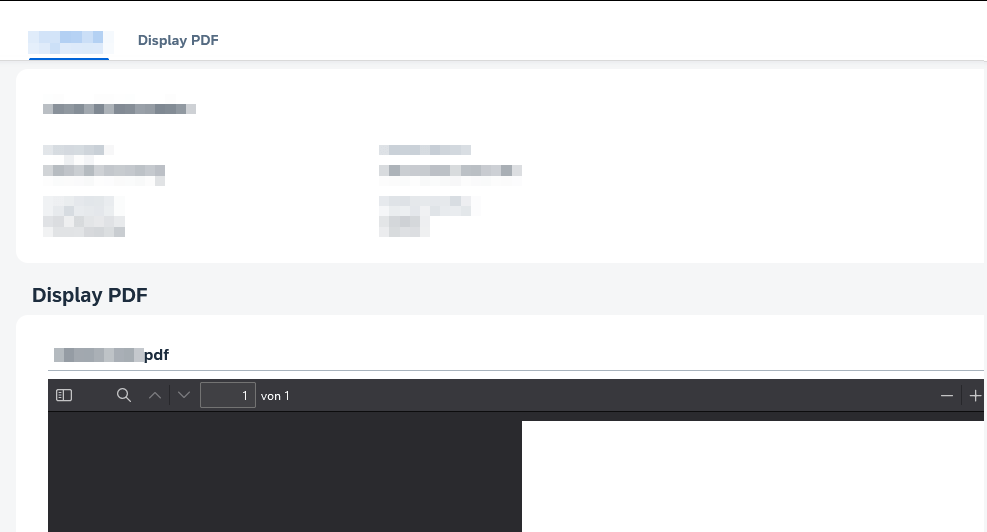
I have a CAP Service that provides a PDF file that I needed to display in a Fiori Elements frontend using the sap.m.PDFViewer. The viewer should be placed in a section on the object page after navigating from the ListReport main page.
My CAP Service has the following annotations to provide the PDF.
  entity pdfFiles : cuid, managed {
    content            : LargeBinary @stream @Core.MediaType: mediaType @Core.ContentDisposition.Filename: fileName @Core.ContentDisposition.Type: 'inline';
    mediaType          : String      @Core.IsMediaType: true;
    fileName           : String      @mandatory;
  }
Add a custom section to your view following this example: https://sapui5.hana.ondemand.com/test-resources/sap/fe/core/fpmExplorer/index.html#/customElements/customSectionContent
Two steps are necessary.
1. Add a new section via the manifest. The template path should match your app namespace.
        "ObjectPage": {
          "type": "Component",
          "id": "ObjectPage",
          "name": "sap.fe.templates.ObjectPage",
          "viewLevel": 1,
          "options": {
            "settings": {
              "editableHeaderContent": false,
              "entitySet": "pdfFiles",
             "content": {
                "body": {
                  "sections" : {
                    "myCustomSection": {
                      "template": "sap.fe.core.fpmExplorer.customSectionContent.CustomSection",
                      "title": "{i18n>pdfSection}",
                      "position": {
                        "placement": "After",
                        "anchor": "StandardSection"
                      }
                    }
                  }
                }
              }
            }
          }
        }
2. Add the section content by defining a new fragment in the file CustomSection.fragment.xml
<core:FragmentDefinition xmlns:core="sap.ui.core" xmlns="sap.m" xmlns:l="sap.ui.layout" xmlns:macro="sap.fe.macros">
	<ScrollContainer
		height="100%"
		width="100%"
		horizontal="true"
		vertical="true">
		<FlexBox direction="Column" renderType="Div" class="sapUiSmallMargin">
			<PDFViewer source="{content}" title="{fileName}" height="1200px">
				<layoutData>
					<FlexItemData growFactor="1" />
				</layoutData>
			</PDFViewer>
		</FlexBox>
	</ScrollContainer>
</core:FragmentDefinition>
On the ObjectPage you will now have a new section containing the PDFViewer.
[CAP] Fiori Elements – Display managed fields as value help
data-model.cds
using {
    managed
} from '@sap/cds/common';

entity managedEntity: managed {
    key ID    : UUID;
        field : String;
}
annotations.cds
using myService as service from '../../srv/myService';

annotate service.managedEntity with @(
    Capabilities.SearchRestrictions: {Searchable: false},
    UI.PresentationVariant         : {
        SortOrder     : [{
            Property  : createdAt,
            Descending: true
        }],
        Visualizations: ['@UI.LineItem']
    },
    UI.HeaderInfo                  : {
        TypeName      : '{i18n>myEntity}',
        TypeNamePlural: '{i18n>myEntities}',
    },
    UI.SelectionFields             : [
        createdAt,
        createdBy
    ],
    UI.LineItem                    : [
    ]
) {
    createdAt @UI.HiddenFilter : false;
    createdBy @UI.HiddenFilter : false;
};
[SAP] Login to SAP for Me and other SAP Websites via Certificate
Go to https://me.sap.com/app/sappassport, request your certificate and install it in your Browser. Working with the BTP is much more convenient now, as you don’t have to enter your credentials all the time.
[CAP] CQL Expand Composition / Deep read
In the documentation they always use a star in string literals like this o => o.`*` to select all fields, but when running this it always failed. However, after some tests I found that this format works with brackets o => o.('*')
https://cap.cloud.sap/docs/guides/providing-services/#–-deep-read
entity myEntity: cuid, managed {
    field1          : String;
    comp            : Composition of one myComposition;
}

aspect myComposition: cuid, managed {
    myCompField: String;
}
        const result = await SELECT.from(myEntity)
            .columns(e => {
                e('*')
                e.comp(c => c.myCompField) //expand composition, but only select 'myCompField'
            })
Update 14.09.2023: is now fixed (#)
[CAP] CQL Deep Update
A Composition of one can be updated via the Parent Entity, like we would do it, when dealing with an Association to one.
entity myEntity: cuid, managed {
    field1          : String;
    comp            : Composition of one myComposition;
}

aspect myComposition: cuid, managed {
    myCompField: String;
}
            const { myEntity } = srv.entities
            const EntityComposition = srv.entities['myEntity.myComposition'] // composition

            srv.after('CREATE', EntityComposition , async (comp, req) => {
                await UPDATE(myEntity, comp.ID)
                    .set({
                      comp : [{ myCompField: 'test' }]
                    })
            })
A Composition of many must be updated via the actual Composition Entity.
entity myEntity: cuid, managed {
    field1          : String;
    comp            : Composition to many myComposition;
}

aspect myComposition: cuid, managed {
    myCompField: String;
}
    const EntityComposition = srv.entities['myEntity.myComposition'] // composition

    srv.after('CREATE', EntityComposition , async (comp, req) => {
        await UPDATE(EntityComposition, { up__ID: comp.up__ID, ID: comp.ID }).set({ myCompField: 'test' })
    })
[CAP] UploadSet http test file
How to create an uploadSet in combination with a CAP backend: https://blogs.sap.com/2021/08/18/my-journey-towards-using-ui5-uploadset-with-cap-backend/
You can test the uploadSet CAP backend part using these http calls:
### Create file
# @name file
POST http://localhost:4004/v2/admin/Files
Authorization: Basic admin:
Content-Type: application/json

{
    "mediaType": "image/png",
    "fileName": "picture.png",
    "size": 1000
}

### Fill Variable from Response
@ID = {{file.response.body.$.d.ID}}

### Upload Binary PNG content
PUT http://localhost:4004/v2/admin/Files({{ID}})/content
Authorization: Basic admin:
Content-Type: image/png

< ./picture.png

### Get uploaded png
GET http://localhost:4004/v2/admin/Files({{ID}})/content
Authorization: Basic admin:
The picture.png file must be in the same folder as the http test file.
[CAP] Dynamically set destination in package.json for an external connection
  "cds": {
    "requires": {
      "sfsf": {
        "kind": "odata-v2",
        "credentials": {
          "destination": "<set during runtime>",
          "path": "/odata/v2",
          "requestTimeout": 18000000
        }
      }
    }
  },
  /*
   * Handover query to some external SF OData Service to fecth the requested data
   */
  srv.on("READ", Whatever, async req => {

        const sf_api_def = cds.env.requires['sfsf'] //defined in package.json

        sf_api_def.credentials.destination = "myDestinationName" //set your Destination name, could come from a customizing table

        const sfsfSrv = await cds.connect.to(sf_api_def)

        return await sfsfSrv.run(req.query)
    })
[CAP] Providing destinations locally using .env
The provided example
destinations="[{\"name\": \"TESTINATION\", \"url\": \"http://url.hana.ondemand.com\", \"username\": \"DUMMY_USER\", \"password\": \"EXAMPLE_PASSWORD\"}]"
didn’t work for me. I had to change it to the following format:
destinations=[{"name": "TESTINATION", "url": "http://url.hana.ondemand.com", "username": "DUMMY_USER", "password": "EXAMPLE_PASSWORD"}]
You can check the current value using:
process.env.destinations