Homelab, Linux, JS & ABAP (~˘▾˘)~
 

[SuccessFactors] Create JavaScript Date-Object from DateTimeOffset

The SuccessFactors oData v2 API is returning timestamps in Unix Epoch format (unix-style milliseconds since 1/1/1970).

Many timestamp fields are of type Edm.Int64. When receiving the milliseconds as Integer, you can directly create a date-object of it using Date(1658237847).

But some timestamps are of type Edm.DateTimeOffset, i.e.: "createdDate": "/Date(1652252620000+0000)/".
When binding a timestamp property with an ODataModel, the internal lib datajs will convert the /Date(...)/ value to a standard JS date-object.

But in my case I manually had to convert the timestamp and this is the shortest way I found to convert the epoch string into a JS date-object.

// SF epoch date string
const SFdateString = '/Date(1652252620000+0000)/' 

// remove the '/' on both sides and create the date object
const oDate = eval('new ' + SFdateString .slice(1, -1))

console.log(typeof oDate )
console.log(oDate )

const oDateTimeFormat = sap.ui.core.format.DateFormat.getDateTimeInstance({
          pattern: "YYYY-MM-dd HH:mm"
})
return oDateTimeFormat.format(oDate)


[Workflow] You are not one of the possible agents of task ‘&1’

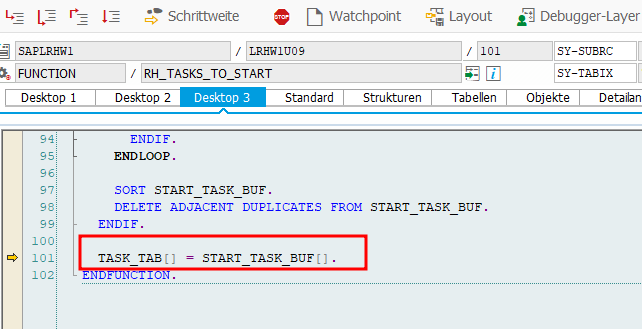
The Function Module SAP_WAPI_START_WORKFLOW uses RH_TASK_START_CHECK to check, if the calling user is allowed to start the Workflow.
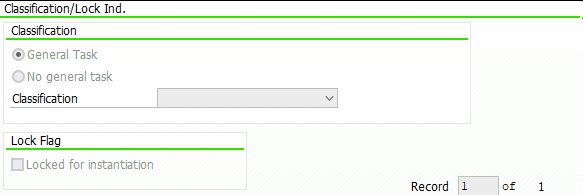
In it RH_TASKS_TO_START is used to read the WF and Task IDs which the user is allowed to call. But it uses a buffer and if you just did some changes to the Workflow Classification, i.e. setting it to General Task,

it can be that this check will continue to fail as it is reading old data from the buffer.

You will receive an error message from Message Class WZ: You are not one of the possible agents of task ‘&1’

I had this problem sometimes when transporting objects to the next system, but until now I could not figure out when it happens and when not.

Luckily the solution is pretty simple, just call T-Code SWU_OBUF and do a buffer refresh/synchronization.
Rob Dielemans has explained the cause very well here.

[ABAP] Read ACTION_COMMENTS from a Workitem

If you want to use the decision note / action comment of a Workitem in a mail step, you have to write a method to read the comment and then pass it to the mail step. To do this, I always create a method in my Workflow helper class called READ_DECISION_NOTE with the following parameters:

For the importing parameter, you must store the Workitem ID of your Decision Step in you Workflow Container, by creating a Container Element like DecisionWIID of type SWW_WIID and fill it with the Workitem ID of your decision step. Then use it later for calling your method READ_DECISION_NOTE.

Regarding the exporting parameter; If you want to send a mail via class cl_cbs you’re a fine reading the comment as string. But if you want to use the default workflow mail step, and you are expecting comments with more than >255 characters, you will need the comment as SOLI_TAB.

If you take a look at the decision Workitem, you will properly find the Attribute ACTION_COMMENTS, which is of type SWC_VALUE and is of type char with length 255. But this is only the case, if the entered text has less than < 255 characters.

If the user entered a text with more than 255 characters, the text is split and there are more elements named with ACTION_COMMENTS_1, ACTION_COMMENTS_2 etc. (Note 3017539)

There is the function module SAP_WAPI_READ_CONTAINER to read Workitems. As input for the function module, you need the Workitem ID from the decision step. You will then find the ACTION_COMMENTS in the simple_container table.

    DATA: return_code              TYPE sy-subrc,
          simple_container         TYPE TABLE OF swr_cont,
          message_lines            TYPE TABLE OF swr_messag,
          message_struct           TYPE TABLE OF swr_mstruc,
          subcontainer_bor_objects TYPE TABLE OF swr_cont,
          subcontainer_all_objects TYPE TABLE OF swr_cont,
          object_content           TYPE TABLE OF solisti1.

    " Read the work item container from the work item ID
    CALL FUNCTION 'SAP_WAPI_READ_CONTAINER'
      EXPORTING
        workitem_id              = iv_wiid
      IMPORTING
        return_code              = return_code
      TABLES
        simple_container         = simple_container
        message_lines            = message_lines
        message_struct           = message_struct
        subcontainer_bor_objects = subcontainer_bor_objects
        subcontainer_all_objects = subcontainer_all_objects.


    TRY.
        DATA(text) = simple_container[ element = 'ACTION_COMMENTS' ]-value.
      CATCH cx_sy_itab_line_not_found.
      " Check for ACTION_COMMENTS_1 etc.
      " or follow the approach below
    ENDTRY.

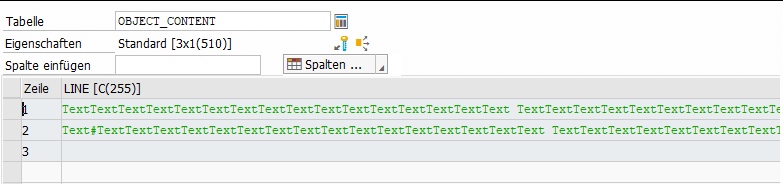
The comment is also added as SOFM-Object (SAP-Office-Document) to the Workitem. Just check the table subcontainer_all_objects, which is also returned by the previous function module, for attribute _ATTACH_COMMENT_OBJECTS (or _ATTACH_OBJECTS or DECISION_NOTE or _DECISION_COMMENT). With function module SO_DOCUMENT_READ_API1 you can then get the actual comment.

    " Read the _ATTACH_COMMENT_OBJECTS element
    " There can be more than one comment, just take the last one
    LOOP AT subcontainer_all_objects INTO DATA(comment_object) WHERE element = '_ATTACH_COMMENT_OBJECTS'.
    ENDLOOP.

    CHECK comment_object-value IS NOT INITIAL.

    " Read the SOFM Document
    CALL FUNCTION 'SO_DOCUMENT_READ_API1'
      EXPORTING
        document_id    = CONV so_entryid( comment_object-value )
      TABLES
        object_content = object_content
      EXCEPTIONS
        OTHERS         = 1.

    et_decision_note = object_content.

* Or create a single string
*    LOOP AT object_content INTO DATA(lv_soli).
*      CONCATENATE text lv_soli-line INTO text.
*    ENDLOOP.

This SOLI_TAB can be passed to a default mail step and will keep line breaks etc.

Update 02.06.2026: A shorter approach can be the following.

    DATA(lo_workitem) = NEW /iwwrk/cl_wf_read_workitem( iv_wiid ).

    lo_workitem->get_wi_appr_comments( IMPORTING et_wi_appr_comm = DATA(lt_wi_appr_comm)
                                                 ev_return_code  = DATA(lv_return_code) ).

    READ TABLE lt_wi_appr_comm INTO DATA(ls_decision) WITH KEY obj_name = 'COMMENT' obj_type = 'TXT'.

    DATA(soli_tab) = cl_document_bcs=>string_to_soli( ls_decision-text ).

But string to soli_tab is always a bit risky when having a text with >255 characters (see here).

[CAP] BAS – port 4004 is already in use by another server process

If the default port 4004 is already open and you want to see what is bound to it, select View -> Find Command -> Ports Preview

Solution to kill another “watch.js” process using/blocking the port: https://answers.sap.com/questions/13016130/sap-business-application-studio-stop-running-serve.html
To archive the same in a single command use:

lwctl -c basic-tools kill -9 $(lwctl -c basic-tools ps aux | grep watch.js | awk '{print $2}')

As alternative, change the default port by adding a new port in package.json to the start script, for example: “start”: “cds run –port 4003” and use npm run start instead of cds watch.


Update 20.02.2023: Just had the problem again due to a VPN disconnect. But this time I had an application running using cds run. Therefore, I had to change the command from watch.js to cds.js:

lwctl -c basic-tools kill -9 $(lwctl -c basic-tools ps aux | grep cds.js | awk '{print $2}')

Update 10.05.2023: A better approach seems to be killing the node process. This should work in both situation.

lwctl -c basic-tools kill -9 $(lwctl -c basic-tools ps aux | grep node | awk '{print $2}')

Update 29.02.2024: With the BAS migration to Code – OSS the previous commands were not working anymore, but this new command seems to work:

kill -9 $(ps aux | grep cds.js | awk '{print $2}')
# or
kill -9 $(ps aux | grep cds-dk | awk '{print $2}')

Update 15.07.2025:

kill -9 $(ps aux | grep cds | awk '{print $2}')

[CAP] Query teamMembersSize from SuccessFactors

const sfsfSrv = await cds.connect.to('sfsf')

// Option 1: Query Notation
const response = await sfsfSrv.run(SELECT`teamMembersSize`.from`User`.where`userId = ${req.user.id}`)
console.log("option 1: " + response[0].teamMembersSize)

// Option 2: HTTP method-style
const response2 =  await sfsfSrv.get(`/User('${req.user.id}')/teamMembersSize/$value`)
console.log("option 2: " + response2)