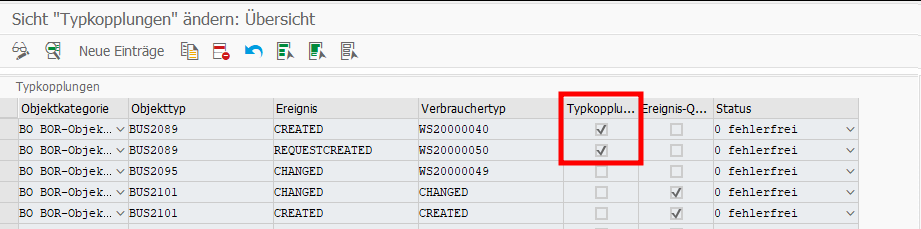
This was pretty easy and after enabling the Apps, I activated the default Workflows WS20000050 (Approve Travel Request) and WS20000040 (Approve Trip) as well. I also checked SWE2 for BU2089 and everything looked good.
But when testing, only the Travel Request Workflow started successfully. When creating a Trip Expense, no Workflow started, instead the Trip Expense directly went to status “Trip Approved” instead of “Trip Completed“. Here you can find an overview of the possible statuses: Trip Status Directory
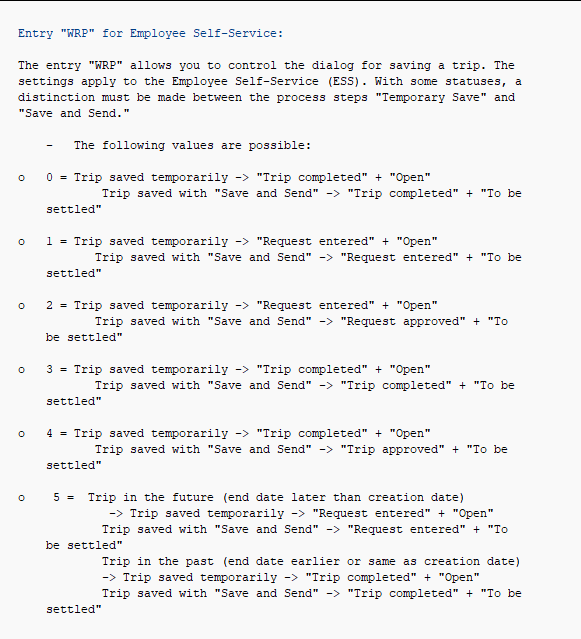
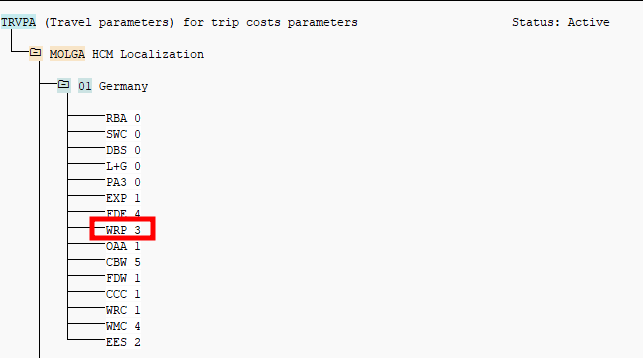
Initially I thought, this is somehow a Workflow issue or the BUS2089 connection does throw the right event. I also found a note related to this: 2792991. But it turned out to be a customizing problem and the answer was only one click away from the Trip Status Directory in the chapter Trip Status Assignment. Here the Feature TRVPA is mentioned. And when looking into the system and reading the documentation via PE03 I found the following
Turned out, for Feature TRVPA and Entry WRP the value 4 was set. After changing it to 3, the right trip status got set and the workflow got triggered.
As always, the solution is quite simple once you know it, but it took quite a while to figure it out.
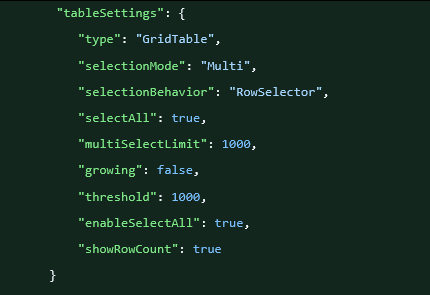
Recently I was working on a Fiori Elements application, where users should be able to select large amount of rows. With the default ResponsiveTable this cannot be achieved, but Fiori Elements with Grid Table allows multi-selection of thousands of rows via Multi-selection plug-in. This is what I’ve added to the manifest.json.
Honestly, not 100% sure if every property was necessary, but I couldn’t find a clear documentation what property is valid for a GridTable…
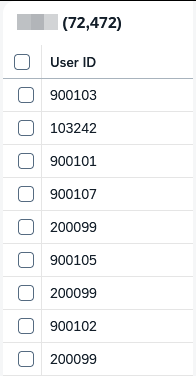
The result looked good and selecting large amounts of rows was possible in the UI! However, actions like “Go” or table refresh after a custom action generated a massive OData $filter:, because each selected row got appended to the filter like this:
$filter=ID eq 'uuid1' or ID eq 'uuid2' or ... (4000+ ORs)
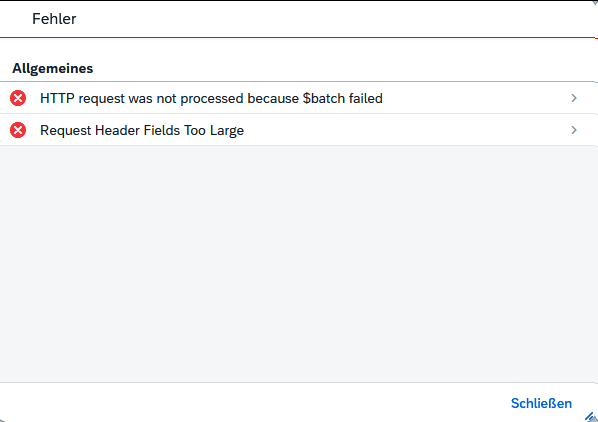
When sending such a large request, it exceeds that standard Header Limit: “Request Header Fields Too Large“
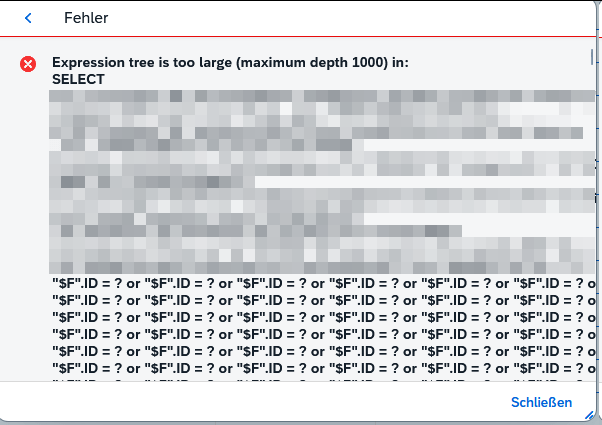
Now the request went through and reached the backend. But CAP parses the request to CQN, which becomes a deep SQL WHERE tree. SQLite rejects this with “Expression tree is too large (maximum depth 1000)“.
Haven’t tested on HANA, but I wanted to make sure it also works in my local development environment. So I needed to find a way to reduce the Expression tree size.
CAP Solution: Rewrite OR Chain to IN
Intercept READ requests, parse the CQN SELECT.where array, extract IDs, rebuild as ID IN (...) using cds.parse.xpr.
srv/service.js:
const cds = require('@sap/cds');

this.before('READ', 'YourEntity', req => {
  const whereArray = req.query.SELECT?.where;
  if (!Array.isArray(whereArray) || whereArray.length < 50) return;

  const ids = [];
  let i = 0;

  while (i < whereArray.length) {
    // Skip 'or' connectors
    if (typeof whereArray[i] === 'string' && whereArray[i] === 'or') {
      i++;
      continue;
    }

    const refObj = whereArray[i];     // {ref: ['ID']}
    const op = whereArray[i + 1];     // '='
    const valObj = whereArray[i + 2]; // {val: 'uuid'}

    if (refObj?.ref && op === '=' && valObj?.val) {
      ids.push(`'${valObj.val}'`);
      i += 3;
    } else {
      console.log('Pattern mismatch at', i);
      return;
    }
  }

  if (ids.length < 20) return; // Skip small filters

  // Build IN clause
  const condition = `ID in (${ids.join(',')})`;
  req.query.SELECT.where = cds.parse.xpr(condition);[web:180][web:187]

  console.log(`Rewrote ${whereArray.length/3} OR triplets → IN (${ids.length} IDs)`);
});
The handler rebuilds this to ID in ('uuid1','uuid2',...) → compact SQL without deep tree.
This worked, and now the SQLite could process the query! So to summarize what needed to be done:
Grid Table (not Responsive Table) for large datasets.
Multi-selection plug-in (limit: 0 or high value).
Increase max_batch_header_size in your reverse proxy/Gateway – otherwise $filter gets truncated before reaching CAP.
Custom Handler to transform the where condition
Quite complex – at least with the classic ALV, that wouldn’t have been an issue at all…
Update 27.03.2026: Here is a blog tackling a very similar situation, but with RAP instead of CAP: Fiori List Report: The “Process All” Dilemma — Parsing OData $filter in ABAP But with the provided solution it is not possible to select/unselect certain lines, since only the filter criteria are respected and no manual selection/deselection of specific rows is possible.
Regelmäßig bekomme ich die Anfrage, wie unbearbeitete Inbox Items (offene Dialog Workitems) ermittelt und weitergeleitet werden können. Das kann zum Beispiel erforderlich sein, wenn eine Führungskraft ein Unternehmen verlässt und vorher nicht alle Workitems in der Inbox abgearbeitet hat. Diese sollen daher dann meistens der neuen Führungskraft zugewiesen werden. Es gibt verschiedene Wege diese Workitems zu ermitteln und weiterzuleiten.
Mit dem Fuba SAP_WAPI_CREATE_WORKLIST kann man sich den Inbox-Content zu einem User anzeigen lassen (siehe hier), meist scheitert das aber an den Berechtigungen auf der Produktion. Ist aber ein praktisches Mittel, um sich einen schnellen Überblick über die Inbox eines Users zu machen.
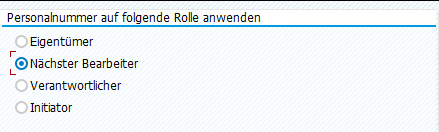
Geht es z.B. speziell nur um Abwesenheitsantrage, könnte man in der PTARQ schauen. Mit dem Report “Belege anzeigen” kann man dann auf die Führungskraft filtern, dazu einfach den Radiobutton “Nächsten Bearbeiter” auswählen und die Personalnummer der Führungskraft eingeben. Hier gibt es einen direkten Absprung in das Workflow-Log und man kann sich die Workitem ID des Dialogschritts über Springen → Technische Workitem-Anzeige holen, um damit in der SWIA weiterleiten zu können.
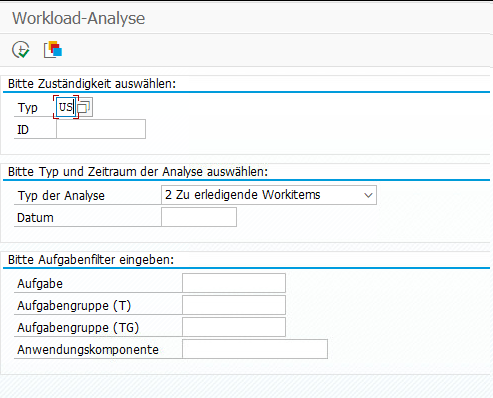
Ich nutze für diese Aufgabe aber vorwiegend die SWI5. Typ US auswählen + die User ID und weiter unten auf “Zu erledigende Workitems” stellen. Optional noch auf einen speziellen Aufgabentyp filtern.
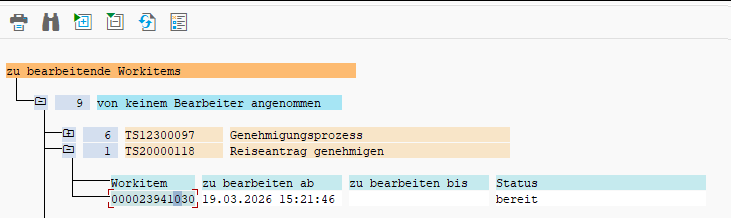
Als Ergebnis erhält man eine Liste mit Aufgaben IDs und zugehörigen Workitem IDs. Und da es direkt die Workitem ID des Dialogschritts ist, kann man damit direkt in der SWIA selektieren und das Workitem weiterleiten.
In YAML werden Anker (&) und Aliase (*) verwendet, um Redundanzen zu vermeiden, indem Konfigurationsblöcke einmal definiert und an anderer Stelle wiederverwendet werden. Super praktisch!