
A few years ago, I bought a used Samsung CHG90 (LC49HG90DMUXEN) monitor on eBay. After I got the device, I learned that this model series had a hardware issue (see here or here). Fortunately, the problems only occurred every few weeks. Since some people on Reddit wrote that a firmware update had improved the situation, even though it was a hardware issue, I tried updating the firmware as well. There is a generic update guide from Samsung, but it is not detailed enough to actually do the update…
The required firmware update can be found on the Samsung website under support > user manuals and guide and by searching with the model code: LC49HG90DMUXEN
https://www.samsung.com/de/support/user-manuals-and-guide

Although the latest firmware version is from September 2020, I was able to perform an update because my monitor was still running version 1017.2. The hardest part was figuring out how to find the software updater in the monitor menu, but after a quick search in the documentation, I found the right section. The trick was to open the menu and hold down the arrow key for 5 seconds.
https://downloadcenter.samsung.com/content/UM/202103/20210305193233676/BN46-00699A-Eng.pdf
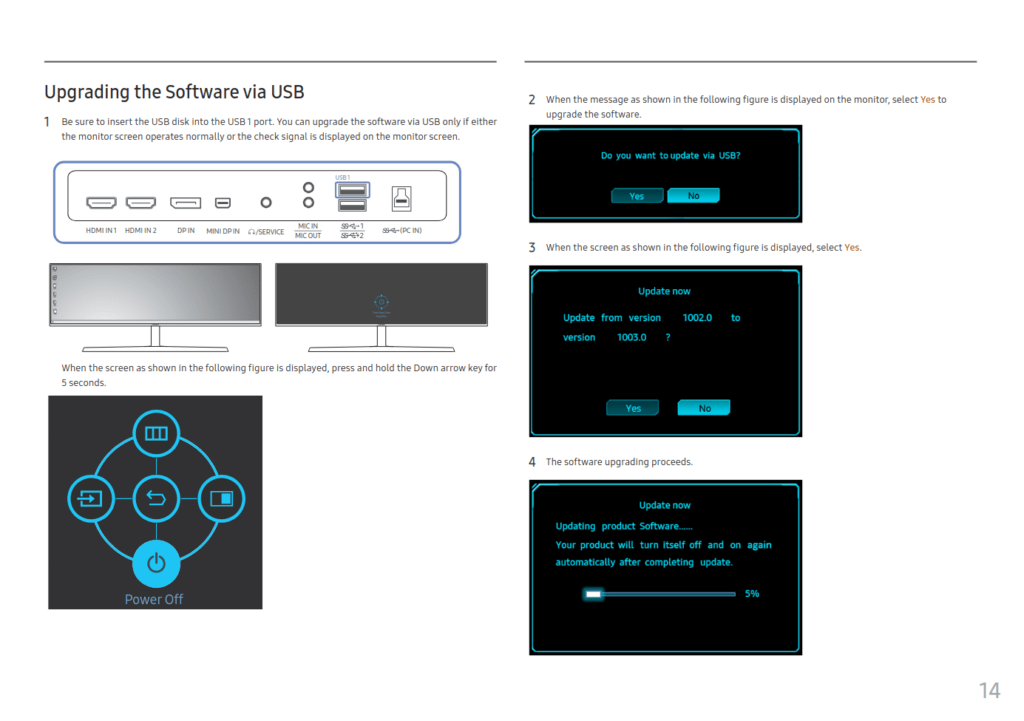
The update took only a few seconds and completed successfully. Let’s see if this improves anything…