
Homelab, Linux, JS & ABAP (~˘▾˘)~
 

[Hardware] Monitor Firmware Update on my Samsung CHG90 (2017)

A few years ago, I bought a used Samsung CHG90 (LC49HG90DMUXEN) monitor on eBay. After I got the device, I learned that this model series had a hardware issue (see here or here). Fortunately, the problems only occurred every few weeks. Since some people on Reddit wrote that a firmware update had improved the situation, even though it was a hardware issue, I tried updating the firmware as well. There is a generic update guide from Samsung, but it is not detailed enough to actually do the update…

The required firmware update can be found on the Samsung website under support > user manuals and guide and by searching with the model code: LC49HG90DMUXEN

https://www.samsung.com/de/support/user-manuals-and-guide

Although the latest firmware version is from September 2020, I was able to perform an update because my monitor was still running version 1017.2. The hardest part was figuring out how to find the software updater in the monitor menu, but after a quick search in the documentation, I found the right section. The trick was to open the menu and hold down the arrow key for 5 seconds.

https://downloadcenter.samsung.com/content/UM/202103/20210305193233676/BN46-00699A-Eng.pdf
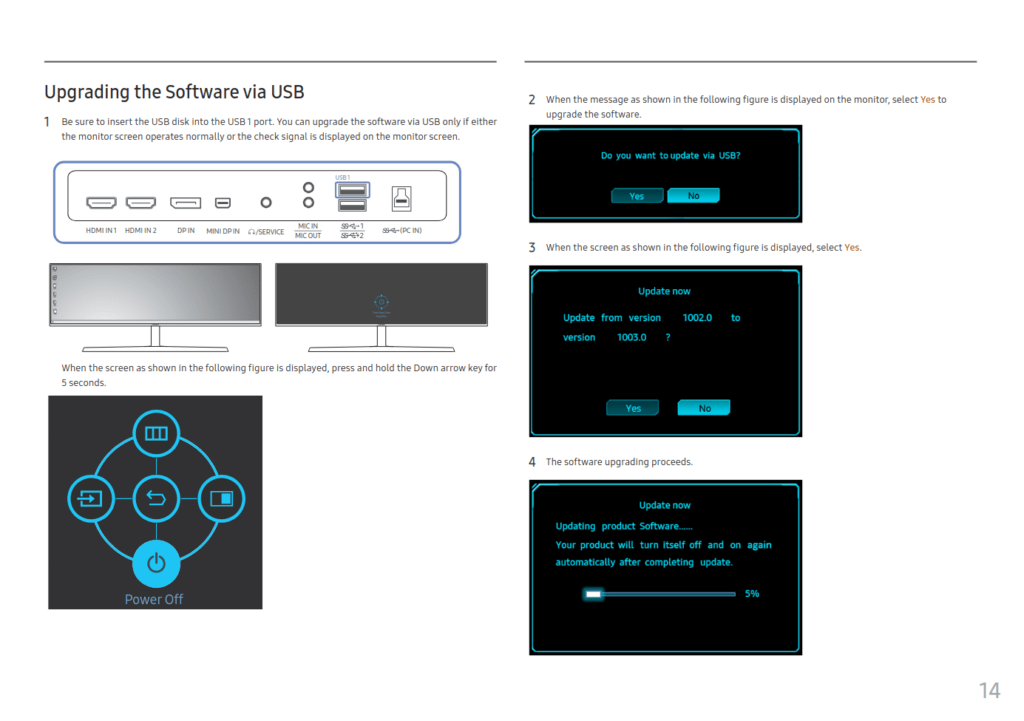
The update took only a few seconds and completed successfully. Let’s see if this improves anything…


[Linux Mint] Wemos D1 Mini (ESP8266) not recognized

I had a few D1 Minis lying around that I wanted to flash WLED onto. But when plugging into my main PC running Linux Mint 21, no device got recognized. The D1 Mini was just flashing its blue LED light 2 times and that was all. I had already checked before, whether the USB cable is also a Data Link cable, because now and then you accidentally grab a USB cable which is charging only.

Since I was pretty sure it wasn’t a hardware problem, I checked dmesg for any suspicious messages. I’m using an alias named klog to beautify the output.

sudo dmesg -t -L=never -l emerg,alert,crit,err,warn --human --nopager

And indeed there were some messages regarding USB.

usbfs: interface 0 claimed by ch341 while 'brltty' sets config #1

Since brltty is software for people with visual impairment, I don’t need it and therefore uninstalled it.

sudo apt remove brltty
sudo apt autoclean && sudo apt autoremove

And after removing brltty, my D1 Mini got recognized immediately. Fortunately, the solution was very simple. 🙂

Update 19.01.2024: If you receive Cannot open /dev/ttyUSB0: Permission denied errors, when writing to the esp, you have to add your user to the dialout group and re-login. (*)

sudo usermod -a -G dialout $USER

[Software] Ventoy

https://www.ventoy.net

“Ventoy is an open source tool to create bootable USB drive for ISO/WIM/IMG/VHD(x)/EFI files.
With ventoy, you don’t need to format the disk over and over, you just need to copy the ISO/WIM/IMG/VHD(x)/EFI files to the USB drive and boot them directly.”

Download: https://github.com/ventoy/Ventoy/releases
Installation: https://www.ventoy.net/en/doc_start.html

sudo sh Ventoy2Disk.sh -i /dev/sdx