Homelab, Linux, JS & ABAP (~˘▾˘)~
 

[Firefox] Freezes computer

For the past few weeks, my computer was randomly freezing for about 30 seconds. After a quick search, it became clear that it was a memory issue, even though my computer has over 32 GB of RAM…

> journalctl -k -b -o short-precise

Sep 23 09:39:38.873173 myPC systemd-journald: Under memory pressure, flushing caches.
Sep 23 09:39:41.632171 myPC systemd-journald: Under memory pressure, flushing caches.
Sep 23 09:39:44.072486 myPC systemd-journald: Under memory pressure, flushing caches.
Sep 23 09:39:50.630124 myPC systemd-journald: Under memory pressure, flushing caches.
Sep 23 09:40:18.142581 myPC kernel: upowerd invoked oom-killer: gfp_mask=0x140cca(GFP_HIGHUSER_MOVABLE|__GFP_COMP), order=0, oom_score_adj=0

> journalctl -k -b --since "2026-09-23 09:39:30" --until "2026-09-23 09:41:30" \
  | grep -iE 'oom|killed process|kill process|out of memory|memory cgroup'

Sep 23 09:40:18 myPC kernel: oom-kill:constraint=CONSTRAINT_NONE,nodemask=(null),cpuset=/,mems_allowed=0,global_oom,task_memcg=/user.slice/user-1000.slice/session-c2.scope,task=Isolated Web Co,pid=2666576,uid=1000
Sep 23 09:40:18 myPC kernel: Out of memory: Killed process 2666576 (Isolated Web Co) total-vm:10469216kB, anon-rss:7162184kB, file-rss:196kB, shmem-rss:1752kB, UID:1000 pgtables:54092kB oom_score_adj:200

As it turned out, the problem was caused by Firefox (Killed process Isolated Web Co). Fortunately, the solution was quite simple. I enabled the unloadOnLowMemory setting:

about:config → browser.tabs.unloadOnLowMemory →true

Since then, everything is running normal again. I also tried to identify a specific extension or website, which needed too much memory via

about:processes

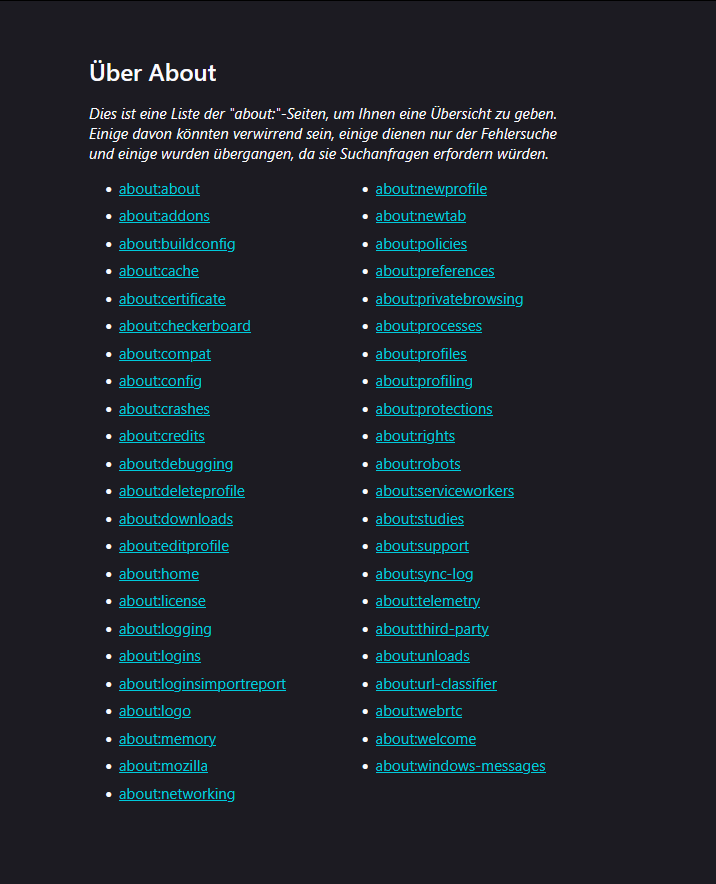
about:memory

but it was nothing out of the ordinary. I guess I just had too many Firefox windows and tabs open…
[Firefox] Tab-Container für Fiori Launchpad

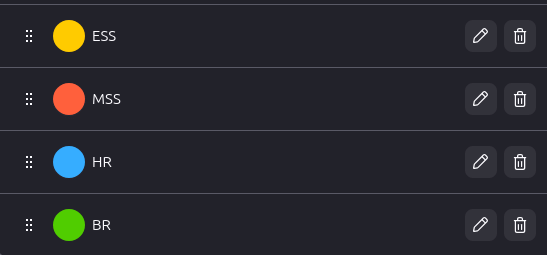
Seit Firefox 153 werden die Tab-Container standardmäßig unterstützt und machen die Erweiterung Firefox Multi-Account Containers überflüssig. Das ist besonders praktisch, wenn man häufiger mit Web-Anwendungen arbeitet, bei denen man verschiedene Benutzer testen muss. Da ich viel mit Fiori Apps und Workflows zu tun habe, muss ich hier häufig mit 3 oder 4 Benutzern abwechselnd testen, um einen Workflow vom Antrag bis zur Genehmigung durchzuspielen. Dafür habe ich mir nun einfach 4 Tab-Container definiert und kann mich in jedem Container mit einem separaten User am Fiori Launchpad anmelden. Super praktisch!

Eine vergleichbare Funktion konnte ich für Edge oder Chrome bisher nicht finden. Hier ist man meist auf das normale Fenster + ein privates Fenster beschränkt. Leider steht in den IT-Landschaften der Kunden Firefox immer seltener zur Verfügung …

[Firefox] Extensions I use in 2026

About seven years ago, I wrote down the Firefox extensions I was using. I kept the list updated for a while. Looking at the list now, many of these extensions are still relevant to me today. So here’s an updated version.

[Firefox] Handy shortcuts I’ve learned recently

Over the past few months, I’ve picked up a few handy Firefox tricks.

Address Bar

  • Find open tabs: Press Ctrl + L (or Ctrl + T) to focus the address bar, then type @tabs or %, hit space, and start typing the tab’s name.
  • Search browsing history: Press Ctrl + L, type @history, hit space followed by your search term.
  • Duplicate the current tab: Focus the address bar with Ctrl + L, then press Ctrl + Shift + Enter. (It opens the same page in a new tab, but without keeping the original tab’s history.)

Tab Management

  • Quickly duplicate a tab: Hold Ctrl and drag a tab to another spot on the tab bar, or just middle‑click the refresh button.
  • Select multiple tabs: Use Ctrl + click to select specific tabs, or Shift + click to select a whole range.
  • Move selected tabs to a new window: After selecting tabs, simply drag them out of the tab bar.

[Firefox] Speichernutzung einzelner Tabs anzeigen

Mittels about:unloads kann man in Firefox eine Übersichtsseite aufrufen, die einem auflistet, welche Tabs wie viel Speicher verbrauchen. Hier können inaktive Tabs mit hohem RAM verbrauch auch entladen werden. Seit Firefox 140 kann man mit einem Rechtsklick auf einen Tab oder eine Tabgruppe und der Funktion Unload Tab dies nun auch manuell für bestimmte Tabs erledigen.

[Terminal] F2 – Command-line batch renaming tool

Project: https://github.com/ayoisaiah/f2
Wiki: https://github.com/ayoisaiah/f2/wiki
Installation: https://github.com/ayoisaiah/f2/wiki/Installation

curl -LO https://github.com/ayoisaiah/f2/releases/download/v1.6.1/f2_1.6.1_linux_amd64.tar.gz
tar -xvzf f2_1.6.1_linux_amd64.tar.gz 
chmod +x f2 
sudo mv f2 /usr/local/bin 
rm f2_1.6.1_linux_amd64.tar.gz 

Renaming a file from ‘img’ to ‘Image’

# test run
f2 -f 'img' -r 'Image'
# performing the actual renaming
f2 -f 'img' -r 'Image' -x
# undo the changes
f2 -u -x

Or renaming episodes from 01_S1.MyEpisode.mp4 to S01E01.MyEpisode.mp4

f2 -f '.._S1' -r 'S01E%02d'

[Software] Ventoy

https://www.ventoy.net

“Ventoy is an open source tool to create bootable USB drive for ISO/WIM/IMG/VHD(x)/EFI files.
With ventoy, you don’t need to format the disk over and over, you just need to copy the ISO/WIM/IMG/VHD(x)/EFI files to the USB drive and boot them directly.”

Download: https://github.com/ventoy/Ventoy/releases
Installation: https://www.ventoy.net/en/doc_start.html

# unmount usb stick first
sudo umount /dev/sdx?* 2>/dev/null
# install to usb stick
sudo sh Ventoy2Disk.sh -i /dev/sdx