In the first sample, for some reason they use jQuery to call an OData Service, in the second sample no OData is called at all. But of course, an OData Service can be used in a Plugin the same way as you do in every other Fiori App. You just have to add your service in the manifest.json like you would normally do:
There are many reasons why a workflow task might not appear in the Inbox app. One reason I always forget to check is quite simple.
Check whether a scenario is configured!
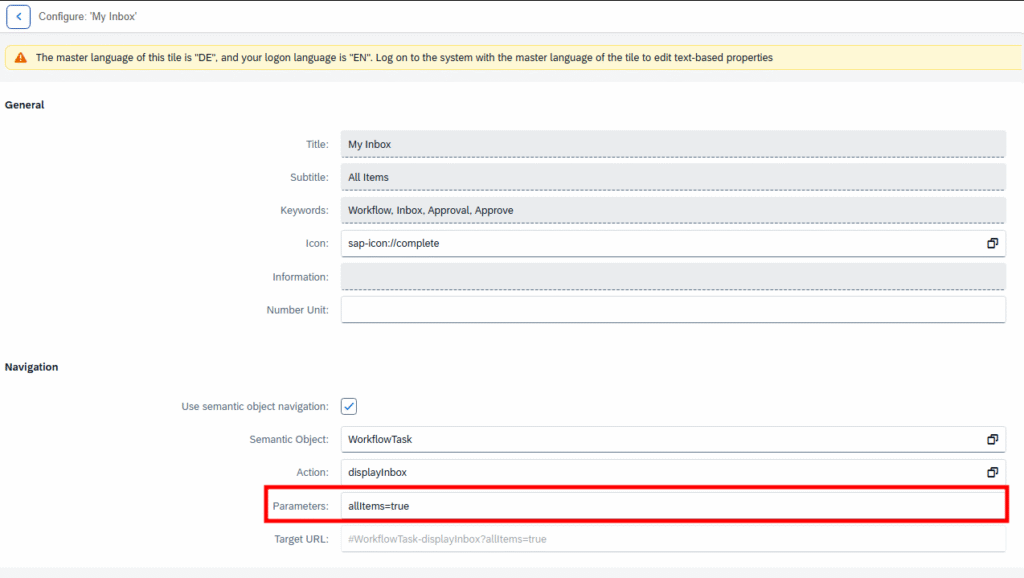
Simply open the Tile configuration and check the Parameter field. If there is a scenario, it would be something like scenarioId=EHS_HS_HAZMAT instead of allItems=true.
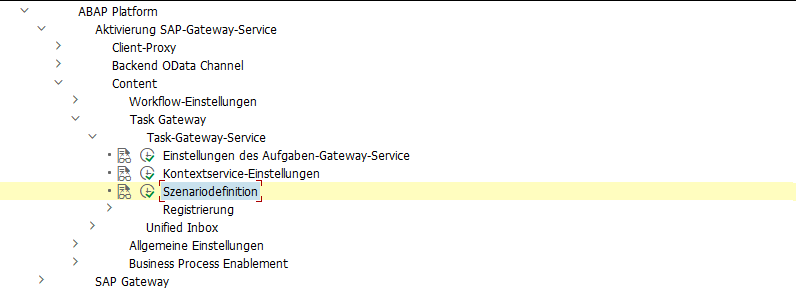
If a scenario is in use, you can find more about it in the customizing here:
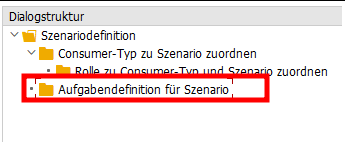
In a scenario, a restriction to certain workflow tasks can be configured.
Kürzlich hatte ich die Situation, dass eine Führungskraft einen Abwesenheitsantrag in der Inbox hatte für eine Abwesenheitsart, die eigentlich nicht genehmigungspflichtig ist. Es hätte also gar kein Genehmigungsworkflow gestartet werden dürfen. Merkwürdigerweise war die beantragte Abwesenheit auch bereits im Infotyp verbucht. Auch konnte man den Antrag in der Inbox weder Ablehnen noch Genehmigen, beides lief auf ein Fehler.
Wie kam es also zu dieser Situation?
Der Mitarbeiter hatte einen Antrag mit einer genehmigungspflichtigen Abwesenheitsart gestellt, wie z.B. Urlaub.
Bevor der Genehmiger diesen Antrag bearbeitet hat, wurde der Antrag vom Antragsteller jedoch nochmal abgeändert. Dies ist über das Stift-Symbol möglich. Dabei wurde dann eine nicht genehmigungspflichtige Abwesenheitsart gewählt, wie z.B. Abbau Überzeit.
In diesem Fall wird der Antrag ohne Genehmigungsprozess durchlaufen und die Abwesenheit wird kurz darauf direkt in den Infotyp geschrieben durch den Verbucherreport.
Jedoch gab es ja bereits einen laufenden Workflow mit einem Workitem in der Inbox des Genehmigers und dieser wurde nicht beendet. Stattdessen wurde in dem Workitem sogar die beantragte Abwesenheitsart aktualisiert, obwohl für diese Abwesenheitsart ja gar keine Genehmigung erforderlich ist und sogar bereits in den Infotyp geschrieben war.
Auch in der Antragsdatenbank spiegelt sich das Problem wider. Der Antrag stand dort im Status ‘POSTED‘ und der Workflow-Status auf ‘STARTED‘.
Ich habe das Szenario dann mit einer Zweiten, nicht genehmigungspflichtigen Abwesenheitsart getestet, also Urlaub erfasst und vor Genehmigung die Abwesenheitsart geändert. Hier wurde jedoch der laufende Workflow korrekterweise beendet.
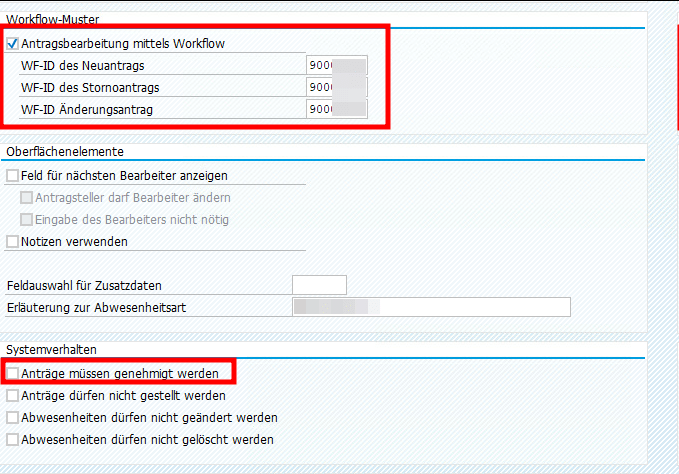
Als ich beide Abwesenheitsarten in der V_T554S_WEB verglichen habe, ist mir aufgefallen, dass bei der problembehafteten Abwesenheitsart ein Workflow gecustomized war, obwohl diese ja nicht genehmigungspflichtig ist. Der Workflow wurde jedoch nur verwendet, um eine Info-Mail zu versenden.
Die Workflow Checkbox ließ sich leider nicht deaktivieren (vermutlich weil es schon Anträge zu der Abwesenheitsart gibt). Aber es scheint, als führt dieses Workflowcustomizing dann zu Inkonsistenzen, wenn in einem laufenden Antrag von einer genehmigungspflichtigen Abwesenheitsart zu einer nichtgenehmigungspflichtigen gewechselt wird.
Dieser Post nur als Erinnerung, falls ich nochmal in so eine Situation laufe. Vielleicht habe ich dann die Chance, es zu verifizieren.
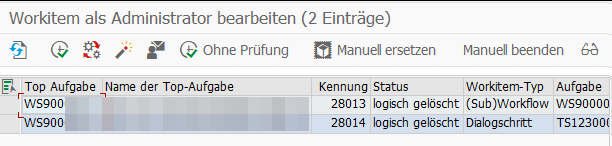
Beim Einrichten der 1-Stufigen Genehmigung von Urlaub mit dem Standard Workflow 21500001 bin ich in folgenden Fehler gelaufen in der Inbox nach Drücken des Genehmigungsbuttons.
Merkwürdigerweise wurde der Urlaubsantrag erfolgreich genehmigt und trotzdem gab es eine Fehlermeldung. Nach kurzem debuggen war auch klar warum. Der Antrag wurde erst erfolgreich genehmigt und dann wurde das gleiche Coding nochmal durchlaufen und führte zu einer Kollisionsmeldung.
Daraufhin habe ich mir den BAdI /IWWRK/BADI_WF_BEFORE_UPD_IB angeschaut. Dort konnte ich zwei Implementierungen zum Thema Leave Approval finden und in beiden war der Workflow 21500001 als Filterkriterium eingetragen. Das erklärte, warum die Genehmigungslogik zweimal durchlaufen wurde.
Daraufhin habe ich nach einem Hinweis gesucht und folgenden gefunden: 2658528. Der beschreibt zwar eine andere Fehlermeldung, aber die Lösung war genau die Aussage, die ich gesucht habe.
Die Implementierung HRMSS_LEAVE_APPROVAL musste also deaktiviert werden. Ich habe das über die SE19 gemacht, auch wenn das bedeutete, dass ich nun als letzter Änderer eines SAP-Objekts drin stehe. Anscheinend geht es auch über den Funktionsbaustein ENH_BADI_IMG_ACTIVITY_TOGGLE wie hier beschrieben.
It took me some time to figure out, how I can provide a label for an action parameter.
I try to separate all my translations in label.cds file. This means, the annotations are not placed where the entities or actions are defined. If you have the action definition and the label annotations in one file, you could simply do the following for an action:
trip-service.cds
    entity Trip as projection on db.Trip
        actions {
            action approval();
            action rejection(reason: String @title: '{i18n>reason});
        };
But if you separate both, you need to access somehow the defined action to add the annotation. Following a short snippet, how it works. The important part is, that you have to write a complete new annotation block for your actions.
trip-service.cds without label
service tripService @(requires: 'authenticated-user') {

    entity Trip as projection on db.Trip
        actions {
            action approval();
            action rejection(reason: String);
        };

}
label.cds
using my.namespace as db from '../db/index';
using tripService from '../srv/trip-service';

annotate db.Trip with @title: '{i18n>trips}' {
    description   @title      : '{i18n>description}';
    status        @title      : '{i18n>status}';
    // etc.
}

// solution
annotate tripService.Trip actions {
    rejection(reason @titlel: '{i18n>reason}' )
}
You can use the SAP_WAPI_CREATE_WORKLIST function module to display all workitems that are currently in a user’s inbox. This is very useful, as you cannot use the “on behalf of” function in MyInbox.