
So far, I have only made backups of my Home Assistant VM via Proxmox to my TrueNAS server. To also have a remote backup, I stumbled over Nextcloud Backup. For the add-on installation you have to add a repository, but after that the setup is straight forward.
Year: 2024
[nodejs] Merge PDFs using pdf-lib
https://github.com/Hopding/pdf-lib
const { PDFDocument } = require('pdf-lib')

// files = [{ fileName: 'test1.pdf, content: arraybuffer },{ fileName: 'test2.pdf, content: arraybuffer }]

mergePdfs: async function (files) {
        try {
            const mergedPdf = await PDFDocument.create()

            for (let file of files) {
                const pdf = await PDFDocument.load(file.content)
                const copiedPages = await mergedPdf.copyPages(pdf, pdf.getPageIndices())
                copiedPages.forEach((page) => mergedPdf.addPage(page))
            }

            const mergedPdfFile = await mergedPdf.save()
            const buffer = Buffer.from(mergedPdfFile)
            return await buffer.toString('base64') // return as buffer or base64 encoded file
        } catch (err) {
            console.error(err.message)
        }
}
[Home Assistant] Confirmation dialog
Just noticed that you can add a confirmation dialog on a tab action.
https://www.home-assistant.io/dashboards/actions/
https://www.home-assistant.io/dashboards/actions/#options-for-confirmation
Very helpful to prevent things from being activated by mistake.
type: entity
entity: input_boolean.sleep_status
tap_action:
  action: toggle
  confirmation:
    text: Activate sleep mode?
icon: mdi:sleep
icon_color: indigo
[Docker] IT-Tools
Really cool tool collection. Check it out here.
https://github.com/CorentinTh/it-tools
version: '3.3'
services:
    it-tools:
        image: 'corentinth/it-tools:latest'
        container_name: it-tools
        restart: unless-stopped
        ports:
            - 8080:80
        environment:
            - UID=1000
            - GID=1000
[CAP] Approuter – Increase session lifetime
To increase the session lifetime, simply increase the sessionTimeout property in the xs-app.json of your approuter.
https://www.npmjs.com/package/@sap/approuter#xs-appjson-configuration-file
xs-app.json
{
  "welcomeFile": "index.html",
  "authenticationMethod": "route",
  "logout": {
    "logoutEndpoint": "/do/logout"
  },
  "sessionTimeout": 60,
  "routes": []
}
[PDF.js] Get PDF Viewer when it’s available in DOM and fully initialized
https://github.com/mozilla/pdf.js/wiki/Third-party-viewer-usage
<iframe id="pdf-js-viewer" src="/pdf/web/viewer.html?file=" title="webviewer" frameborder="0" width="100%" height="700" allowfullscreen="" webkitallowfullscreen=""/>
            displayPdf: async function (id) {
                const pdfArrayBuffer= await getPdf(id)
                const pdfViewerIFrame = await getPdfViewer()
                await pdfViewerIFrame.contentWindow.PDFViewerApplication.initializedPromise
                await pdfViewerIFrame.contentWindow.PDFViewerApplication.open(pdfArrayBuffer)
            },

            getPdfViewer: function (id = 'pdf-js-viewer') {
                return new Promise((resolve, reject) => {
                    let pdfViewerIFrame = document.getElementById(id)
                    //if already loaded in DOM, return it
                    if (pdfViewerIFrame?.contentWindow?.PDFViewerApplication) {
                        resolve(pdfViewerIFrame)
                    } else {
                        //if not loaded yet, set up eventListener
                        document.addEventListener("webviewerloaded", async () => {
                            pdfViewerIFrame = document.getElementById(id)
                            resolve(pdfViewerIFrame)
                        })
                    }
                })
            }
This logic helped me to get the PDFViewerApplication in every situation correctly, for example when reloading the page with F5 or when having the PDF viewer already loaded and just wanting to open another PDF file.
[JavaScript] Create array of unique property values from an array of objects
const a = [
      {'id': 1, 'name': 'Max'},
      {'id': 2, 'name': 'Tom'},
      {'id': 3, 'name': 'Max'},
      {'id': 4, 'name': 'Max'}
    ];

let r = [...new Set(a.map(u => u.name))] // result ["Max", "Tom"]
[SuccessFactors] Display technical field names
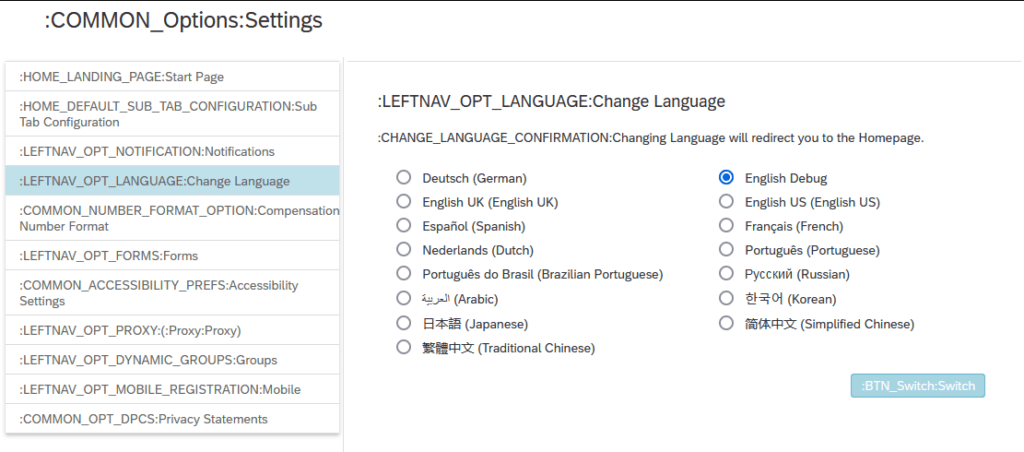
Go to Settings ⇾ Change Language ⇾ Switch to English Debug
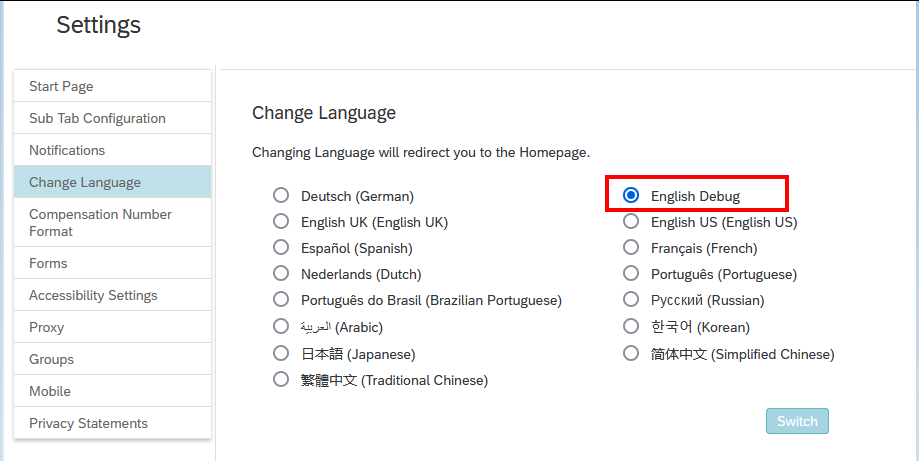
And everything becomes much more beautiful 🙂
[JavaScript] groupBy
https://developer.mozilla.org/en-US/docs/Web/JavaScript/Reference/Global_Objects/Object/groupBy
const people = [
  { name: "Max", age: 10 },
  { name: "Tim", age: 15 },
  { name: "Pip", age: 25 },
]

function adultsOnly({age}) {
if (age >= 18) {
    return 'adult'
  } else {
    return 'minor'
  }
}

const organized = Object.groupBy(people, adultsOnly)

console.log(organized)
[Home Assistant] Display Reolink Doorbell Live Stream
In addition to the gallery-card, which I use to display camera recordings, I also have a live stream from each of my cameras on my dashboard. This is very easy to set up using standard cards.
camera_view: live
type: picture-glance
title: ""
entities:
  - entity: binary_sensor.haustuer_motion
  - entity: binary_sensor.haustuer_person
  - entity: binary_sensor.haustuer_visitor
camera_image: camera.haustuer_fluent
aspect_ratio: "4:2.8"
tap_action:
  action: navigate
  navigation_path: /lovelace-bornkamp/camera_door
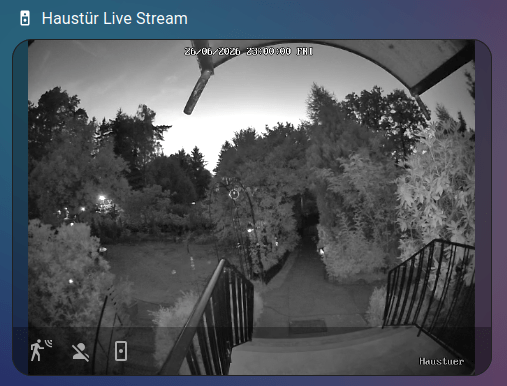
When clicking on the card, it navigates to a new view displaying the stream in full-screen. To do this, set the view type to type: panel.
theme: kibibit-dark-cards
title: cam door
path: camera_door
type: panel
badges: []
cards:
  - camera_view: live
    type: picture-glance
    title: ""
    entities:
      - entity: binary_sensor.haustuer_motion
      - entity: binary_sensor.haustuer_person
      - entity: binary_sensor.haustuer_visitor
    camera_image: camera.haustuer_clear