Homelab, Linux, JS & ABAP (~˘▾˘)~
 

[Fiori] Travel Expense Workflow not triggered

Recently I had to configure the Travel Fiori Apps on a H4S4 System.

My Travel Requests for Business Traveler (MTR)
My Travel and Expenses for Business Traveler (MTE)
My Inbox – Approve Travel Requests
My Inbox – Approve Travel Expenses

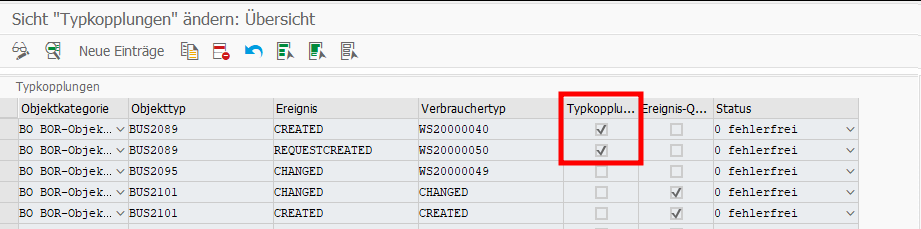
This was pretty easy and after enabling the Apps, I activated the default Workflows WS20000050 (Approve Travel Request) and WS20000040 (Approve Trip) as well. I also checked SWE2 for BU2089 and everything looked good.

But when testing, only the Travel Request Workflow started successfully. When creating a Trip Expense, no Workflow started, instead the Trip Expense directly went to status “Trip Approved” instead of “Trip Completed“. Here you can find an overview of the possible statuses: Trip Status Directory

Initially I thought, this is somehow a Workflow issue or the BUS2089 connection does throw the right event. I also found a note related to this: 2792991.
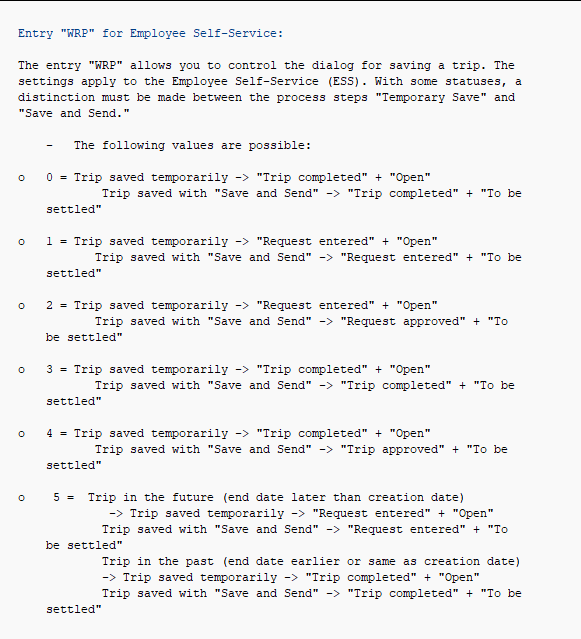
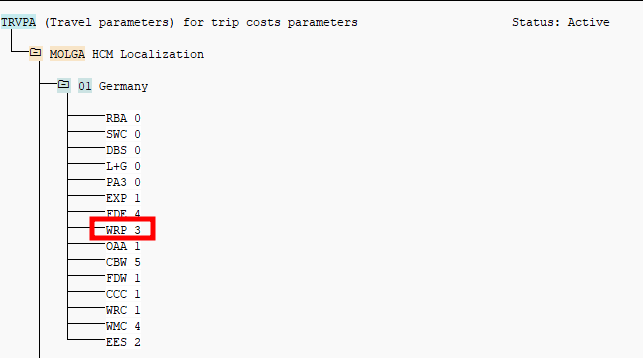
But it turned out to be a customizing problem and the answer was only one click away from the Trip Status Directory in the chapter Trip Status Assignment. Here the Feature TRVPA is mentioned. And when looking into the system and reading the documentation via PE03 I found the following

Turned out, for Feature TRVPA and Entry WRP the value 4 was set. After changing it to 3, the right trip status got set and the workflow got triggered.

As always, the solution is quite simple once you know it, but it took quite a while to figure it out.

[Workflow] Unbearbeitete Inbox Workitems eines Users ermitteln

Regelmäßig bekomme ich die Anfrage, wie unbearbeitete Inbox Items (offene Dialog Workitems) ermittelt und weitergeleitet werden können. Das kann zum Beispiel erforderlich sein, wenn eine Führungskraft ein Unternehmen verlässt und vorher nicht alle Workitems in der Inbox abgearbeitet hat. Diese sollen daher dann meistens der neuen Führungskraft zugewiesen werden. Es gibt verschiedene Wege diese Workitems zu ermitteln und weiterzuleiten.

Mit dem Fuba SAP_WAPI_CREATE_WORKLIST kann man sich den Inbox-Content zu einem User anzeigen lassen (siehe hier), meist scheitert das aber an den Berechtigungen auf der Produktion. Ist aber ein praktisches Mittel, um sich einen schnellen Überblick über die Inbox eines Users zu machen.

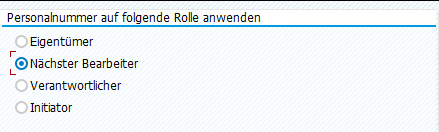
Geht es z.B. speziell nur um Abwesenheitsantrage, könnte man in der PTARQ schauen. Mit dem Report “Belege anzeigen” kann man dann auf die Führungskraft filtern, dazu einfach den Radiobutton “Nächsten Bearbeiter” auswählen und die Personalnummer der Führungskraft eingeben. Hier gibt es einen direkten Absprung in das Workflow-Log und man kann sich die Workitem ID des Dialogschritts über Springen → Technische Workitem-Anzeige holen, um damit in der SWIA weiterleiten zu können.

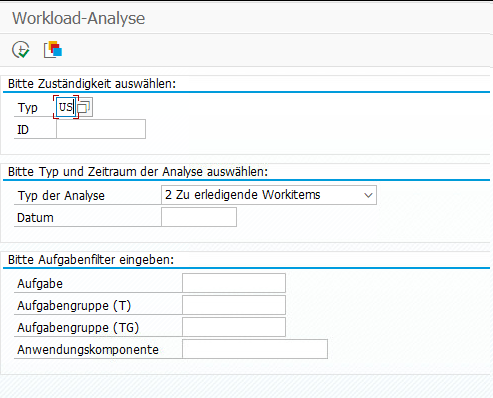
Ich nutze für diese Aufgabe aber vorwiegend die SWI5. Typ US auswählen + die User ID und weiter unten auf “Zu erledigende Workitems” stellen. Optional noch auf einen speziellen Aufgabentyp filtern.

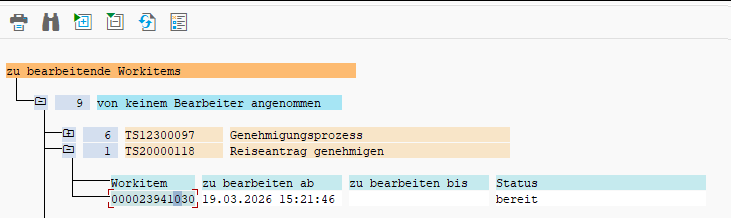
Als Ergebnis erhält man eine Liste mit Aufgaben IDs und zugehörigen Workitem IDs. Und da es direkt die Workitem ID des Dialogschritts ist, kann man damit direkt in der SWIA selektieren und das Workitem weiterleiten.

[Fiori] My Inbox – Tasks not appearing in Inbox

There are many reasons why a workflow task might not appear in the Inbox app. One reason I always forget to check is quite simple.

Check whether a scenario is configured!

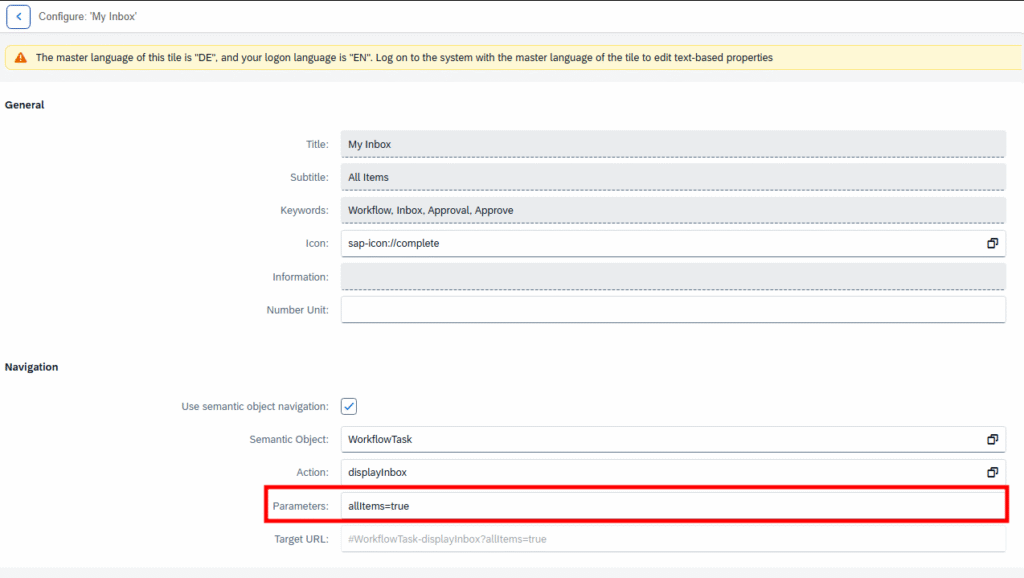
Simply open the Tile configuration and check the Parameter field. If there is a scenario, it would be something like scenarioId=EHS_HS_HAZMAT instead of allItems=true.

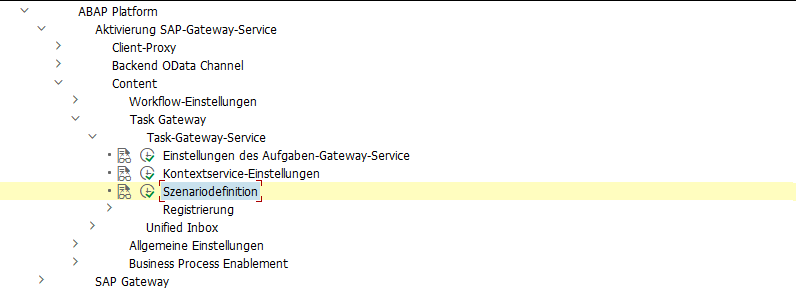
If a scenario is in use, you can find more about it in the customizing here:

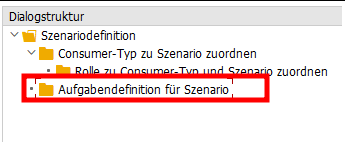
In a scenario, a restriction to certain workflow tasks can be configured.

More information can be found here:
https://help.sap.com/docs/SAP_S4HANA_ON-PREMISE/8308e6d301d54584a33cd04a9861bc52/68c4379a35f644f6b3a73428594d6c3f.html?locale=en-US&version=LATEST
https://community.sap.com/t5/technology-blog-posts-by-sap/sap-fiori-for-sap-s-4hana-fiori-my-inbox-part-1-activation/ba-p/13326175

[Fiori] Abwesenheitsantrag in Inbox für nicht genehmigungspflichtige Abwesenheitsart

Kürzlich hatte ich die Situation, dass eine Führungskraft einen Abwesenheitsantrag in der Inbox hatte für eine Abwesenheitsart, die eigentlich nicht genehmigungspflichtig ist. Es hätte also gar kein Genehmigungsworkflow gestartet werden dürfen. Merkwürdigerweise war die beantragte Abwesenheit auch bereits im Infotyp verbucht. Auch konnte man den Antrag in der Inbox weder Ablehnen noch Genehmigen, beides lief auf ein Fehler.

Wie kam es also zu dieser Situation?

Der Mitarbeiter hatte einen Antrag mit einer genehmigungspflichtigen Abwesenheitsart gestellt, wie z.B. Urlaub.

Bevor der Genehmiger diesen Antrag bearbeitet hat, wurde der Antrag vom Antragsteller jedoch nochmal abgeändert. Dies ist über das Stift-Symbol möglich. Dabei wurde dann eine nicht genehmigungspflichtige Abwesenheitsart gewählt, wie z.B. Abbau Überzeit.

In diesem Fall wird der Antrag ohne Genehmigungsprozess durchlaufen und die Abwesenheit wird kurz darauf direkt in den Infotyp geschrieben durch den Verbucherreport.

Jedoch gab es ja bereits einen laufenden Workflow mit einem Workitem in der Inbox des Genehmigers und dieser wurde nicht beendet. Stattdessen wurde in dem Workitem sogar die beantragte Abwesenheitsart aktualisiert, obwohl für diese Abwesenheitsart ja gar keine Genehmigung erforderlich ist und sogar bereits in den Infotyp geschrieben war.

Auch in der Antragsdatenbank spiegelt sich das Problem wider. Der Antrag stand dort im Status ‘POSTED‘ und der Workflow-Status auf ‘STARTED‘.

Ich habe das Szenario dann mit einer Zweiten, nicht genehmigungspflichtigen Abwesenheitsart getestet, also Urlaub erfasst und vor Genehmigung die Abwesenheitsart geändert. Hier wurde jedoch der laufende Workflow korrekterweise beendet.

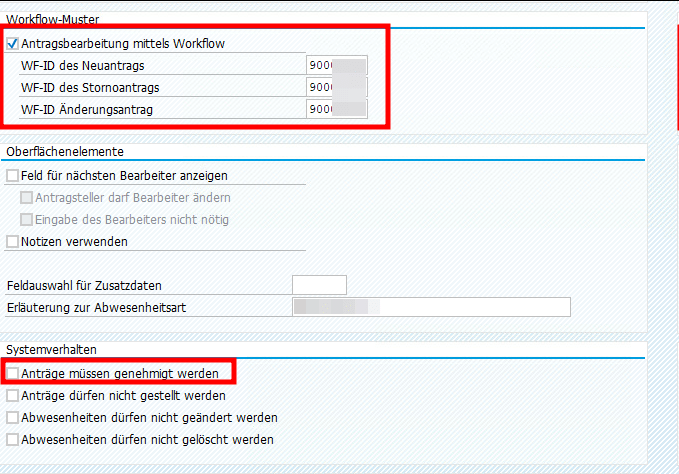
Als ich beide Abwesenheitsarten in der V_T554S_WEB verglichen habe, ist mir aufgefallen, dass bei der problembehafteten Abwesenheitsart ein Workflow gecustomized war, obwohl diese ja nicht genehmigungspflichtig ist. Der Workflow wurde jedoch nur verwendet, um eine Info-Mail zu versenden.

Die Workflow Checkbox ließ sich leider nicht deaktivieren (vermutlich weil es schon Anträge zu der Abwesenheitsart gibt). Aber es scheint, als führt dieses Workflowcustomizing dann zu Inkonsistenzen, wenn in einem laufenden Antrag von einer genehmigungspflichtigen Abwesenheitsart zu einer nichtgenehmigungspflichtigen gewechselt wird.

Dieser Post nur als Erinnerung, falls ich nochmal in so eine Situation laufe. Vielleicht habe ich dann die Chance, es zu verifizieren.

[Fiori] MyInbox – Leave Request Approval: Genehmigung erfolgreich, aber mit Fehler für Workflow 21500001

Beim Einrichten der 1-Stufigen Genehmigung von Urlaub mit dem Standard Workflow 21500001 bin ich in folgenden Fehler gelaufen in der Inbox nach Drücken des Genehmigungsbuttons.

Merkwürdigerweise wurde der Urlaubsantrag erfolgreich genehmigt und trotzdem gab es eine Fehlermeldung. Nach kurzem debuggen war auch klar warum. Der Antrag wurde erst erfolgreich genehmigt und dann wurde das gleiche Coding nochmal durchlaufen und führte zu einer Kollisionsmeldung.

Daraufhin habe ich mir den BAdI /IWWRK/BADI_WF_BEFORE_UPD_IB angeschaut. Dort konnte ich zwei Implementierungen zum Thema Leave Approval finden und in beiden war der Workflow 21500001 als Filterkriterium eingetragen. Das erklärte, warum die Genehmigungslogik zweimal durchlaufen wurde.

Daraufhin habe ich nach einem Hinweis gesucht und folgenden gefunden: 2658528. Der beschreibt zwar eine andere Fehlermeldung, aber die Lösung war genau die Aussage, die ich gesucht habe.

Die Implementierung HRMSS_LEAVE_APPROVAL musste also deaktiviert werden. Ich habe das über die SE19 gemacht, auch wenn das bedeutete, dass ich nun als letzter Änderer eines SAP-Objekts drin stehe. Anscheinend geht es auch über den Funktionsbaustein ENH_BADI_IMG_ACTIVITY_TOGGLE wie hier beschrieben.

[Workflow] AC Rule

Recently, I had the task of assigning a workflow decision step to some users that were customized in a Z-Table. Normally I would have done this, by creating a container element “Actors”, a task that calls a method to return these Actors and use these Actors in the decision step. But this time I tried a custom AC Rule for the first time and I must say it was much easier than expected.

To begin, simply create a function module. The function module only needs two table parameters, AC_CONTAINER and ACTOR_TAB. They can be copied from RH_GET_ACTORS or GM_GET_RESP_FROM_INTERNAL. There you can also check, how to access the AC_CONTAINER table, if you need any input values from the WF. In my case, I just had to read the Z-Table and return the result via ACTOR_TAB.

SELECT * FROM ztable INTO TABLE @DATA(lt_table).

LOOP at lt_table INTO DATA(ls_table).
  "you can also check if the provided user exists by using function module 'SUSR_USER_CHECK_EXISTENCE'
  APPEND VALUE #( otype = 'US' objid = ls_table-userid ) TO actor_tab.
ENDLOOP.

IF lines( actor_tab) = 0.
  RAISE nobody_found.
ENDIF.

Then simply go to tcode PFAC, create a rule, provide the function module and check the flag box at the end.

In the PFAC transaction, you can also simulate the rule resolution.

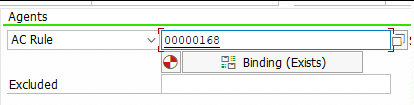
If everything works fine, add the new created rule to the decision step.

And done. Really straight forward.

[Workflow] How do delete a Workflow in status COMPLETED

While searching for a way to delete a workflow, I came across this blog post: https://community.sap.com/t5/technology-blogs-by-members/how-to-logically-delete-workflows/ba-p/12991725
Unfortunately, logically deleting workflows is only possible when the workflow is not in the status COMPLETED.

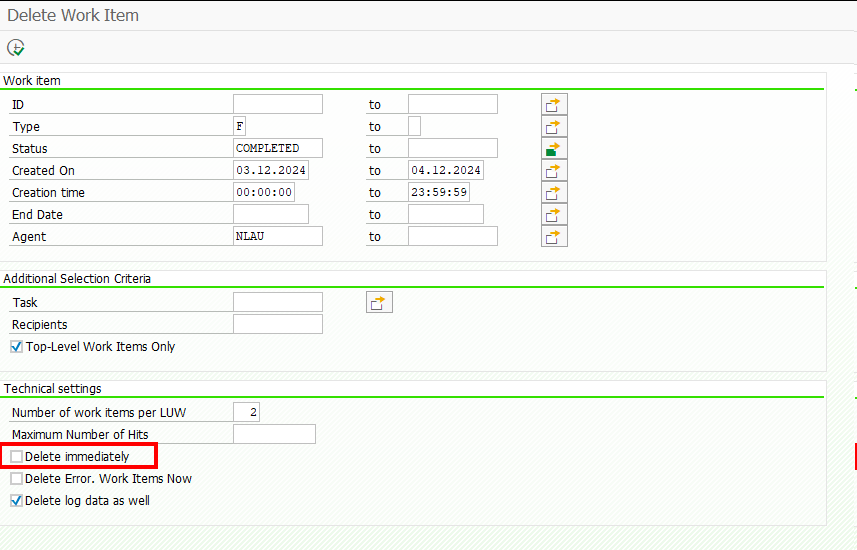
Since my workflow was already in this state, I had to find another way, and found it with transaction code SWWL. Simply find the unique Identification of the top level workitem via t-code SWIA and then use it in SWWL. When running the report, you will first get a list, then simply select the result items you want to delete and hit the trash icon, or restart the selection and check the flag for Delete immediately.

[Workflow] Get all Workitems and Workitem Container related to a pernr

If you have connected any workflows to a pernr via BUS1065 (like it is described here), you can receive all related workflows/workitems related to this pernr via the following code:

    NEW cl_def_im_com_bsp_workflow( )->if_ex_com_bsp_workflow~read_workitems_for_object( EXPORTING iv_swo_objtype = 'BUS1065'
                                                                                                   iv_swo_objkey  = CONV #( lv_pernr ) 
                                                                                         IMPORTING et_workitems   = DATA(lt_workitems) ).

    LOOP AT lt_workitems ASSIGNING FIELD-SYMBOL(<workitems>).
      "If you are only interested in specific workflows, you could filter here
      "WHERE wi_rh_task = 'WSxxxxxxxx' 
      "AND   wi_stat    =  'STARTED'.

      NEW /iwwrk/cl_wf_read_workitem( <workitems>-wi_id )->get_wi_container( IMPORTING et_wi_container = DATA(lt_wi_container) ).
      " access container items via lt_wi_container[ element = 'IV_PERNR'  ]-value

    ENDLOOP.

[Workflow] You are not one of the possible agents of task ‘&1’

The Function Module SAP_WAPI_START_WORKFLOW uses RH_TASK_START_CHECK to check, if the calling user is allowed to start the Workflow.
In it RH_TASKS_TO_START is used to read the WF and Task IDs which the user is allowed to call. But it uses a buffer and if you just did some changes to the Workflow Classification, i.e. setting it to General Task,

it can be that this check will continue to fail as it is reading old data from the buffer.

You will receive an error message from Message Class WZ: You are not one of the possible agents of task ‘&1’

I had this problem sometimes when transporting objects to the next system, but until now I could not figure out when it happens and when not.

Luckily the solution is pretty simple, just call T-Code SWU_OBUF and do a buffer refresh/synchronization.
Rob Dielemans has explained the cause very well here.