Homelab, Linux, JS & ABAP (~˘▾˘)~
 

[FI-TV] My Travel and Expenses for Business Traveler: Change default approver

I was working with the Fiori App My Travel and Expenses for Business Traveler and implemented a new approval workflow. Unlike in the SAP standard workflow, the first approver was not the boss of the employee. The workflow was already working fine, but when sending the travel expense from the Fiori app, it still displayed the boss as approver.
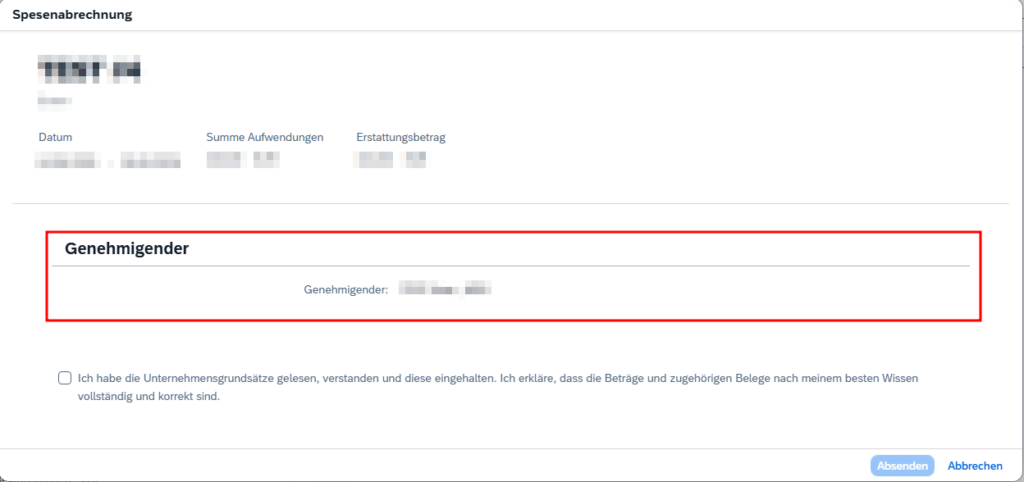
Naturally, the Fiori app does not know anything from the changes on the workflow. So I had to figure out where this approver value comes from and how I could adjust it to match the workflow logic.

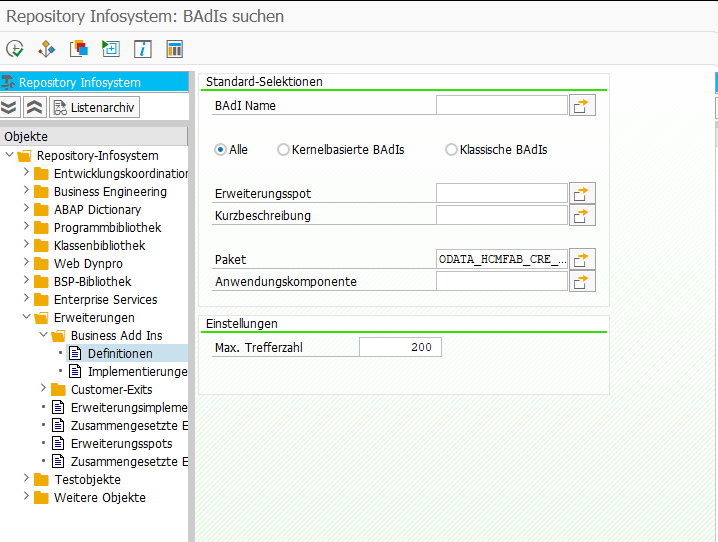
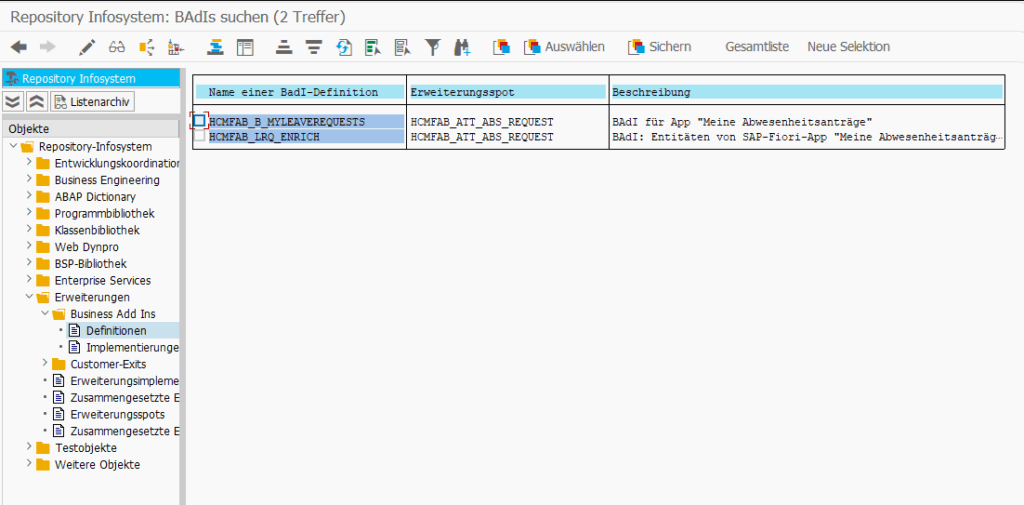
I first went to the official documentation to check if there is any BAdI to change/overwrite the approver.
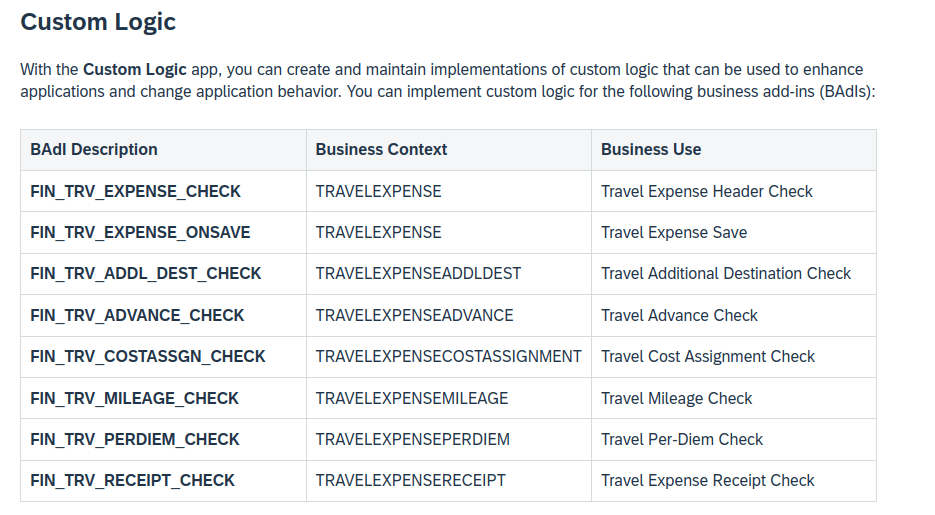
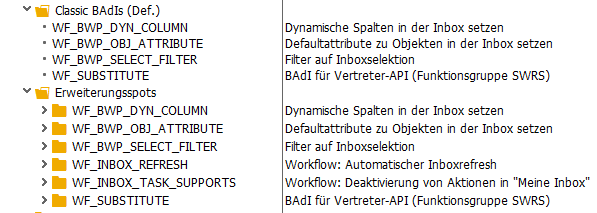
I also checked the note 3260453 – Enablement of Custom Logic for Key User Extensibility option in S/4HANA FIORI app MTE, but it seems like no BAdI was doing the job.

Spoiler: Actually there is a BAdI called FIN_TRV_APPROVER_NAME, but it is not listed here or anywhere else in the documentation. As many times before, incomplete SAP documentation wasted hours of my life…..

Because I could not find a BAdI, I went to the RAP service, to check where the approver is set and if it’s possible to overwrite it in someway.

When clicking the Create and send button in Fiori, a POST request to the endpoint CheckTripAmounts is fired. The response of type cds_ui_travelexpensemanage.TravelExpenseType contains the required value in field TrvlExpnApproverName.

I already knew the corresponding package for RAP-Service.
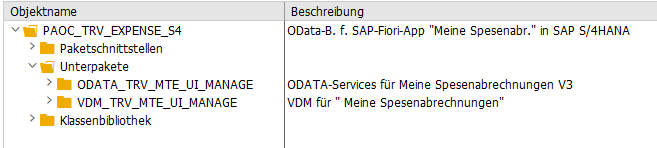
In package ODATA_TRV_MTE_UI_MANAGE I found the root view entity C_TravelExpense which contained the property TrvlExpnApproverName. Its projection I_TravelExpense was located in package VDM_TRV_MTE_UI_MANAGE. I was already afraid, that the approver is somehow read via some CDS association, but it turned out to be added as empty field and properly therefore is manually filled in some behavior implementation.

cast ( ' ' as vdm_trvlexpnapprovername )                                                                             as TrvlExpnApproverName,

The related behavior implementation was in class CL_BP_I_TRAVELEXPENSE and there I found the CheckTripAmounts method, which matched the POST request I saw in the Dev console. And here I found the following logic.

    DATA l_trvlexpnapprovername TYPE char40.
    cl_trv_business_data_s4=>get_approver( EXPORTING iv_employeenumber = api->get_header( )->get_pernr( )
                                                     io_header = api->get_header(  )
                                           IMPORTING ev_approver_name  = l_trvlexpnapprovername
                                                     et_messages       = lt_return ).

When looking in the get_approver method I found the default approver logic via OM, but also a BAdI call at the end.

    DATA lo_badi TYPE REF TO fin_trv_approver_name.
    TRY.
        GET BADI lo_badi.
        DATA(ls_general_data) = io_header->get_general_data( ).
        CALL BADI lo_badi->change_approver_name
          EXPORTING
            iv_traveller_pernr = iv_employeenumber
            is_general_data    = ls_general_data
          CHANGING
            cv_approver_name   = ev_approver_name
            cv_approver_pernr  = ev_approver_pernr.
      CATCH cx_root.
    ENDTRY.

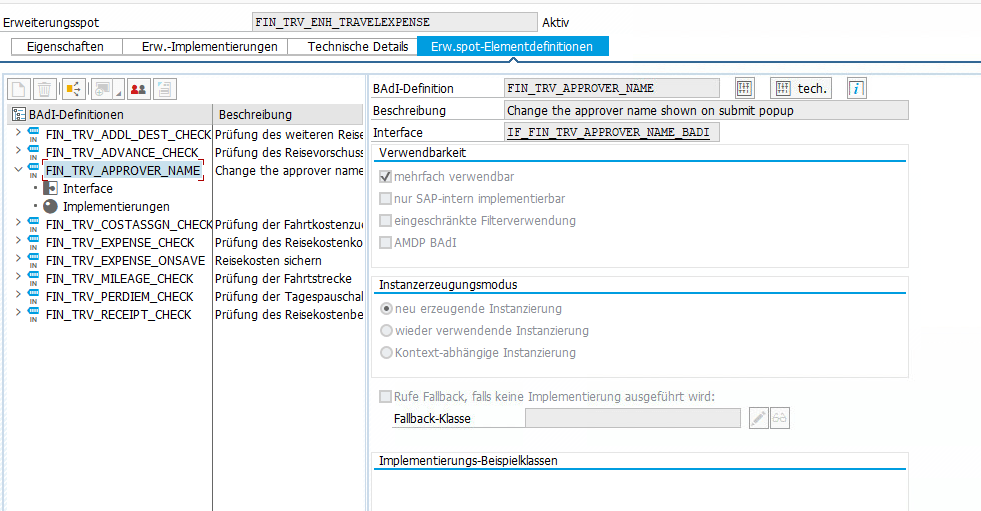
Turned out, there is BAdI to overwrite the approver, it was just not documented…………………. all other eight BAdI’s are mentionend in the documentation.
[Fiori] Meine Formulare: Entgeltnachweise ausblenden “in Vertretung von” (onBehalf)

Möchte man Führungskräften die Möglichkeit geben, in der MyForms App die Formulare ihrer Mitarbeiter einzusehen, kann dies einfach über den HCMFAB_B_COMMON BAdI in der Methode GET_CONFIGURATION realisiert werden.

      IF iv_application_id = gc_application_id-myhrforms.
        ev_enable_onbehalf = boolc( go_employee_api->is_manager( iv_application_id = iv_application_id
                                                                 iv_pernr          = iv_employee_number ) = abap_true ).
      ENDIF.

Im Standard werden der Zeitnachweis und Entgeltnachweis angezeigt. Möchte man nun für die Führungskraft den Entgeltnachweis ausblenden, kann dies über den BAdI HCMFAB_BI_MYFORMS gemacht werden.

In der Methode GET_HIDE_REM_TIME_STATEMENT kann dies z.B. so realisiert werden.

        ev_hide_rem  = abap_false.
        ev_hide_time = abap_false.

        DATA(ownpernr) = go_employee_api->get_employeenumber_from_user( ).

        IF iv_pernr <> ownpernr.
          ev_hide_rem = abap_true.
        ENDIF.

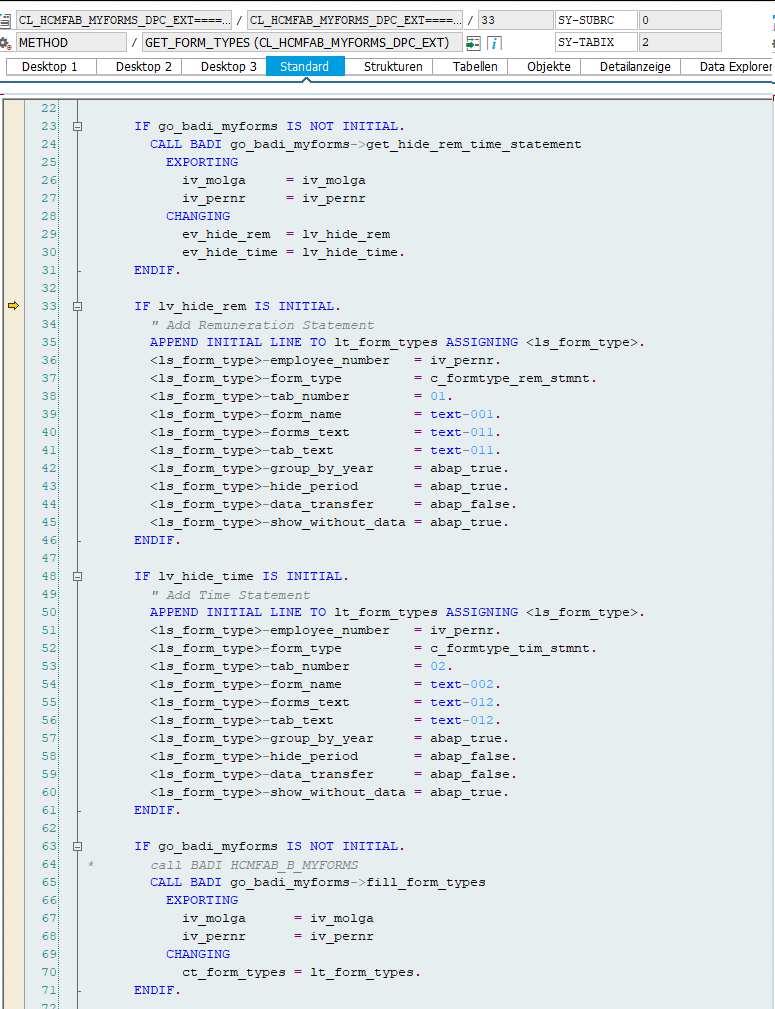
Die Variable ev_hide_rem verhindert das Hinzufügen des Entgeltnachweises im folgenden, wie ab Zeile 25 zu sehen.

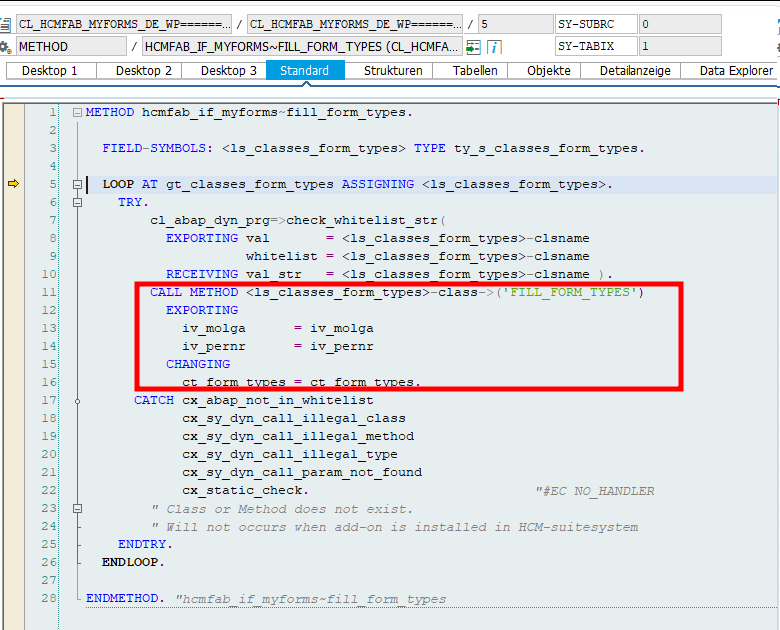
Jedoch ist nach meiner Beobachtung das noch nicht ausreichend, da in der Methode FILL_FORM_TYPES der Entgeltnachweis dann doch wieder hinzugefügt wird.

Daher habe ich den Entgeltnachweis zusätzlich noch in der Methode FILL_FORM_TYPES entfernt.

      DATA(ownpernr) = go_employee_api->get_employeenumber_from_user( ).

      IF iv_pernr <> ownpernr. " Manager dürfen nur Zeitnachweise ihrer Mitarbeiter sehen
        DELETE ct_form_types WHERE form_type <> 'SAP_INT_TIM_STM'.
        RETURN.
      ENDIF.

Die Führungskraft kann nun ausschließlich den Zeitnachweis des Mitarbeiters sehen. Er selbst kann alle Formulare wie gewohnt einsehen.

[Fiori] Meine Formulare: Zeitnachweis Spalten ausblenden

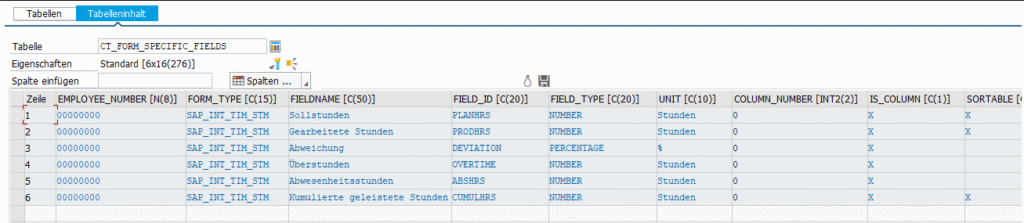
In der Meine Formulare App können über den BAdI HCMFAB_B_MYFORMS ganz einfach Spalten ausgeblendet werden. Dafür eine BAdI Implementierung anlegen und die Methode FILL_FORM_SPECIFIC_FIELDS ausprogrammieren. Zum Entfernen einer Spalte muss diese einfach aus dem CHANGING Parameter ct_form_specific_fields gelöscht werden.

Dabei einfach über den FORM_TYPE auf das entsprechende Formular filtern und die gewünschte Spalte entfernen:

DELETE ct_form_specific_fields WHERE form_type = 'SAP_INT_TIM_STM' AND field_id = 'DEVIATION'.  "Abweichung entfernen

[Fiori] MyInbox – Leave Request Approval: Genehmigung erfolgreich, aber mit Fehler für Workflow 21500001

Beim Einrichten der 1-Stufigen Genehmigung von Urlaub mit dem Standard Workflow 21500001 bin ich in folgenden Fehler gelaufen in der Inbox nach Drücken des Genehmigungsbuttons.

Merkwürdigerweise wurde der Urlaubsantrag erfolgreich genehmigt und trotzdem gab es eine Fehlermeldung. Nach kurzem debuggen war auch klar warum. Der Antrag wurde erst erfolgreich genehmigt und dann wurde das gleiche Coding nochmal durchlaufen und führte zu einer Kollisionsmeldung.

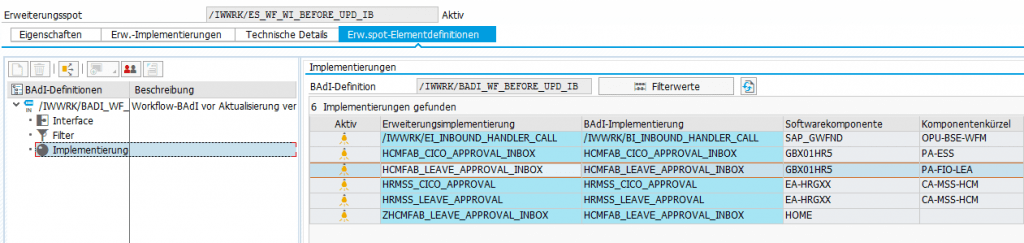
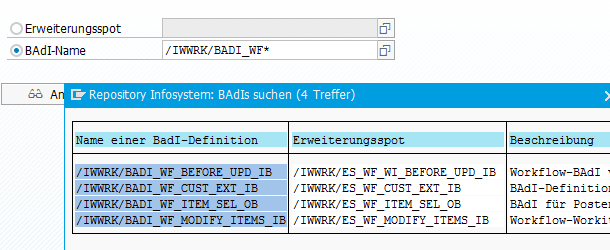
Daraufhin habe ich mir den BAdI /IWWRK/BADI_WF_BEFORE_UPD_IB angeschaut. Dort konnte ich zwei Implementierungen zum Thema Leave Approval finden und in beiden war der Workflow 21500001 als Filterkriterium eingetragen. Das erklärte, warum die Genehmigungslogik zweimal durchlaufen wurde.

Daraufhin habe ich nach einem Hinweis gesucht und folgenden gefunden: 2658528. Der beschreibt zwar eine andere Fehlermeldung, aber die Lösung war genau die Aussage, die ich gesucht habe.

Die Implementierung HRMSS_LEAVE_APPROVAL musste also deaktiviert werden. Ich habe das über die SE19 gemacht, auch wenn das bedeutete, dass ich nun als letzter Änderer eines SAP-Objekts drin stehe. Anscheinend geht es auch über den Funktionsbaustein ENH_BADI_IMG_ACTIVITY_TOGGLE wie hier beschrieben.

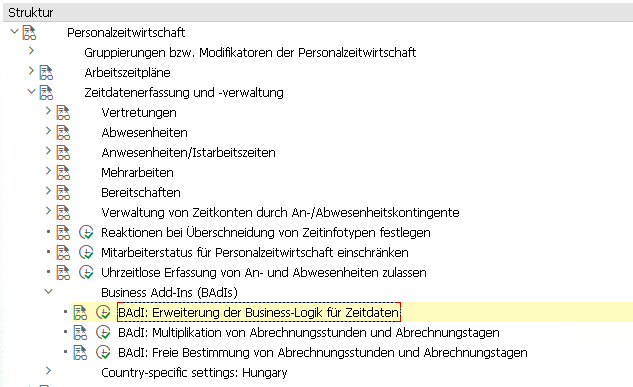
[HR] TMW – Time-Manager-Workplace BAdI

Transaktion: PTMW
BAdI: PT_BLP_USER

Badi Implementierung anlegen und Filter-Ausprägungen hinzufügen. Es muss für jede benötigte Filter-Ausprägung eine eigene BAdI Implementierung und Klasse angelegt werden.

Klasse anlegen und in der Interface Methode die Kundenlogik, wie in der Dokumentation empfohlen, in eine private Methode kapseln.
Bsp.:

  METHOD if_ex_pt_blp_user~process_data.


    CHECK i_record IS BOUND.

    IF  i_record->data->category = cl_pt_tmw_tdm_const=>cat_infty
    AND i_record->data->type     = '2001'.

      "hier die erforderliche Logik rein, z.B. weitere Prüfungen
      process_it2001( EXPORTING i_record    = i_record            " Aktueller Satz
                                i_time_data = i_time_data         " Aktuelle Zeitdaten
                      IMPORTING e_messages  = e_messages          " Ausgabemeldungen für die Transaktion
                                e_time_data = e_time_data   ).    " Neue und geänderte Daten

      "An den konkreten Infotypsatz kommt man z.B. folgendermaßen:
      DATA(record_data) = CAST cl_pt_td_it2001( i_record->data ).
      DATA(p2001)       = record_data->if_pt_td_it2001~p2001.

    ENDIF.


  ENDMETHOD.

[HR] Infotype – add PBO or PAI logic

There are many ways to add custom logic when processing an Infotype. Here are just a few:

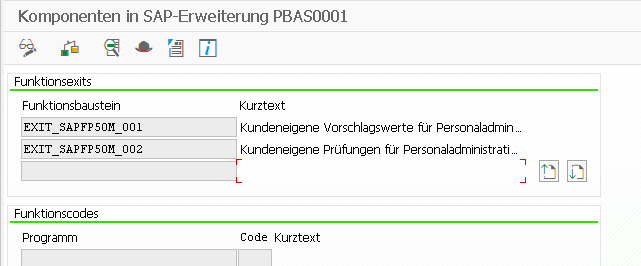
SMOD
PBAS0001
PBAS0002

ZXPADU01 – when an infotype is called
ZXPADU02 – when an action is performed on an infotype

https://regotz.jimdofree.com/abap/dynpro/infotypen-pai-pbo/

BAdI’s

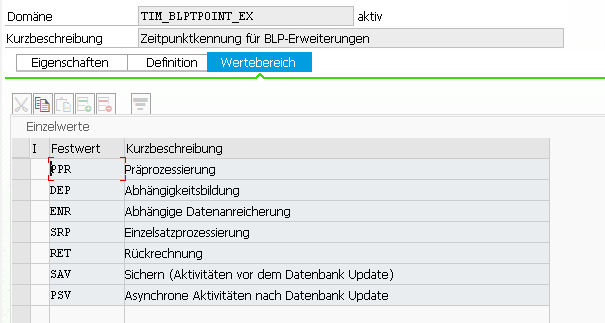
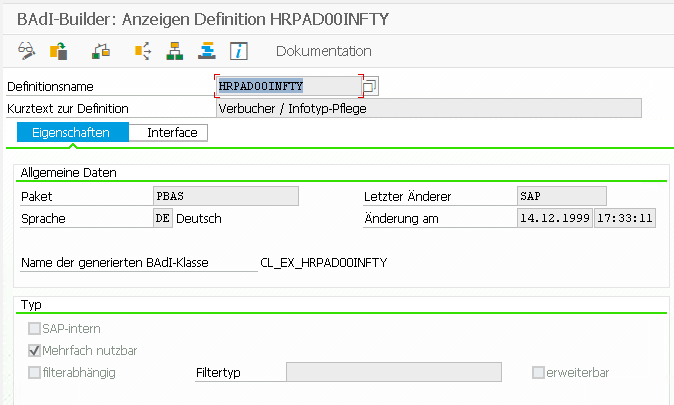
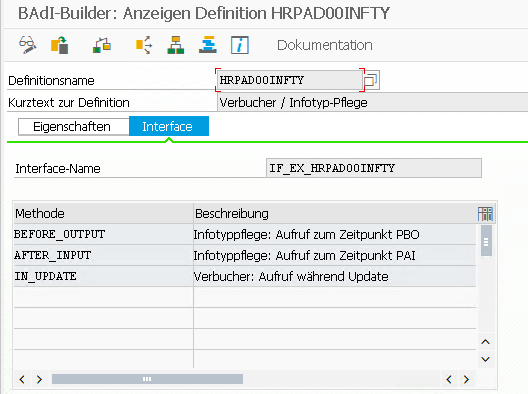
  • HRPAD00INFTY (method IN_UPDATE) is called by the old infotype framework (PA30, SAP50UPR)
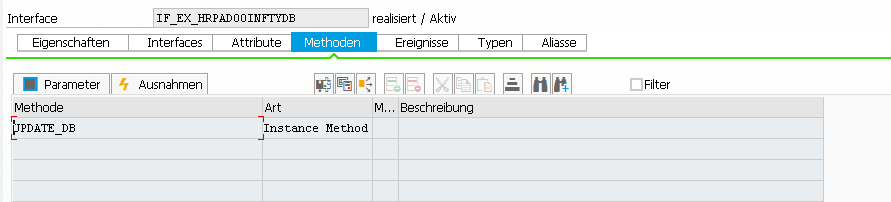
  • HRPAD00INFTYDB (method UPDATE_DB) is called in the decoupled infotype framework

BAdI: HRPAD00INFTY – Verbucher / Infotyp-Pflege

This image has an empty alt attribute; its file name is image-1.png

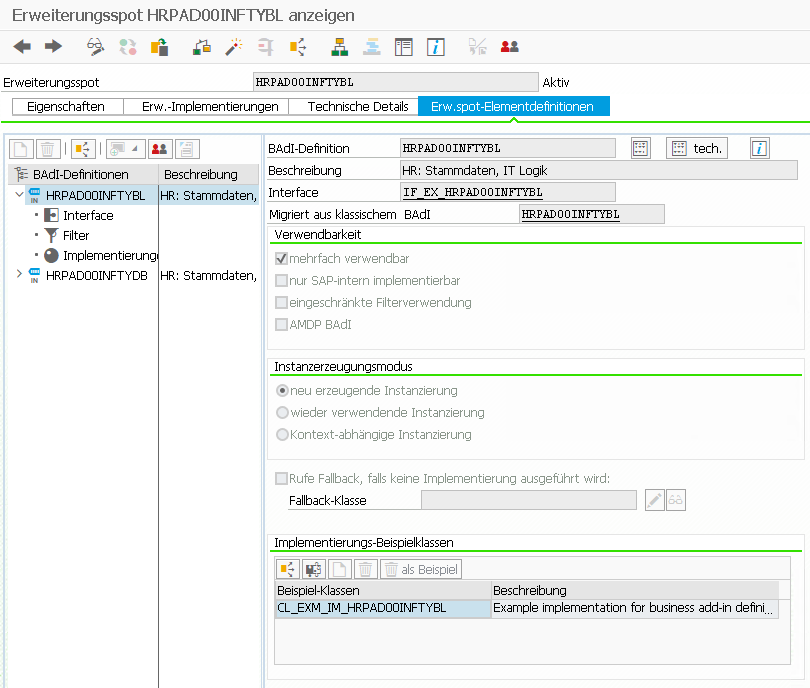
This image has an empty alt attribute; its file name is image-2.png
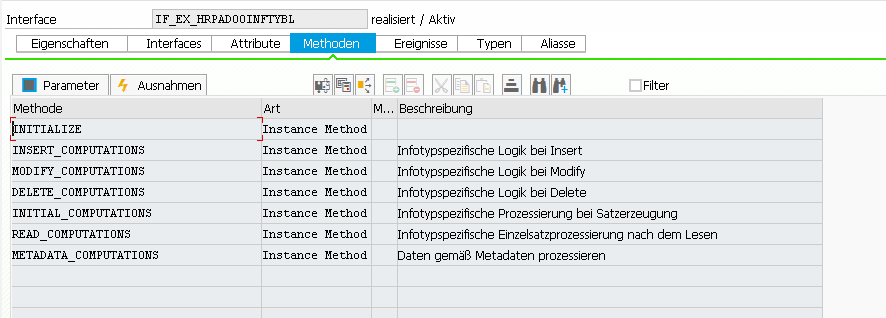
Interface: IF_EX_HRPAD00INFTY

BAdI: HRPAD00INFTYDB – HR: Stammdaten, Infotype DB Update Logik

“The BAdI is called, after the decoupled infotype framework writes the infotype data to the database. This is done during method FLUSH.”
Note: The Infotypes 2000-2999 are not decoupled yet! More here and here.

IF_EX_HRPAD00INFTYBL
IF_EX_HRPAD00INFTYDB

[Fiori] Send notification mail if workitem is forwarded in MyInbox

Workitem function modules

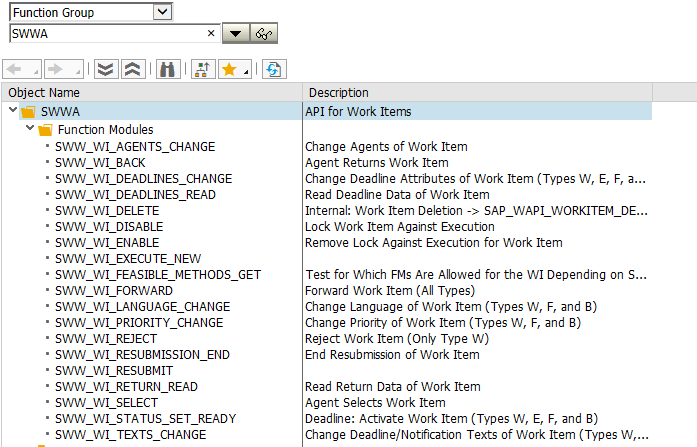
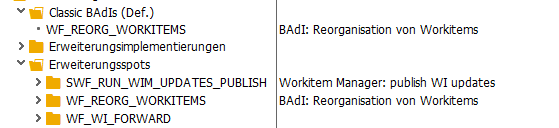
If you forward a workitem manually from the MyInbox or via function module SAP_WAPI_FORWARD_WORKITEM, the function module SWW_WI_FORWARD will be called. There the SAP implemented a BAdI call of the BAdI WF_WI_FORWARD.

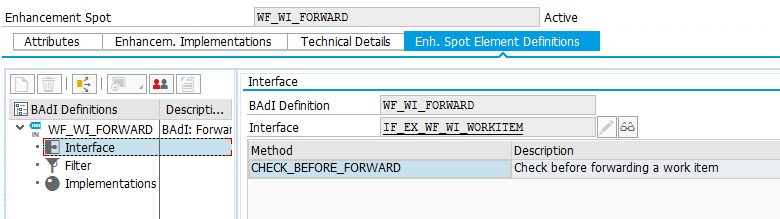
BAdI WF_WI_FORWARD

The BAdI provides a method to add additional checks, when forwarding a workitem. I will use it, to send notification mails.

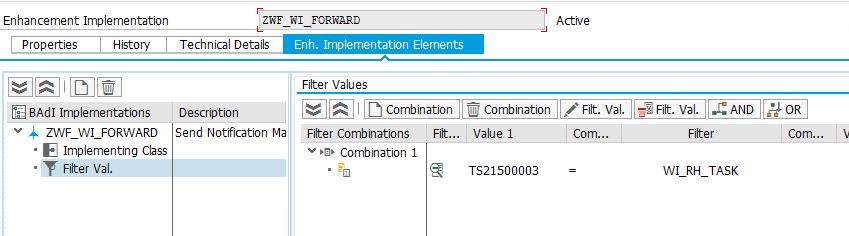
BAdI Filter

Create your own BAdI implementation and add a task id as filter. In my case it’s the task TS21500003 of the leave request approval workflow.
Now your implementation will only be called, if this specific workitem is forwarded. Now we implement the method CHECK_BEFORE_FORWARD. The method has enough parameters to get all necessary information to enrich the mail text.

IF_EX_WF_WI_WORKITEM~CHECK_BEFORE_FORWARD Paramter

First the workitem container is read out of the context. There we get the _WI_OBJECT_ID element, which contains the request object reference. With this information we are able to get the current request object out of the workflow. I pass this into antother class where I already have a mail sending implementation.
  METHOD if_ex_wf_wi_workitem~check_before_forward.
*---------------------------------------------------------------------------------*
* This BAdI implementation is used to send an info mail when a workitem is forwarded.
*---------------------------------------------------------------------------------*

    TRY.

        "Get workitem container and requestId
        DATA(container) = im_workitem_context->get_wi_container( ).

        container->get_value_ref( EXPORTING name       = |_WI_OBJECT_ID|
                                  IMPORTING value_ref  = DATA(lr_req_id) ).

        ASSIGN lr_req_id->* TO FIELD-SYMBOL(<lpor>).

        "Get current request object
        DATA(lo_req) = NEW cl_pt_req_wf_attribs( )->bi_persistent~find_by_lpor( lpor = <lpor> ).

        "Send an info mail to each new agent (should be only one)
        LOOP AT im_table_new_agents INTO DATA(new_agent).
          zcl_hcm_leave_request_assist=>send_mail( io_req         = CAST cl_pt_req_wf_attribs( lo_req )
                                                   iv_tdname      = mc_mailtext
                                                   iv_pernr       = cl_hcmfab_employee_api=>get_instance( )->get_employeenumber_from_user( iv_user = new_agent-objid ) ).
        ENDLOOP.


      CATCH cx_hcmfab_common.
      CATCH cx_swf_cnt_elem_not_found.
      CATCH cx_swf_cnt_container.
        "In error case, do nothing. The workitem should still be forwarded.
        RETURN.
    ENDTRY.

    "Write Info to WF Log
    MESSAGE s001(00) WITH |Forward: Mail { mc_mailtext }| INTO DATA(lv_message).
    im_workitem_context->set_message_to_log( im_function = CONV #( lv_message )         "max char30
                                             im_message = VALUE #( msgid = sy-msgid
                                                                   msgty = sy-msgty
                                                                   msgno = sy-msgno
                                                                   msgv1 = sy-msgv1 ) ).
    COMMIT WORK.
  ENDMETHOD.

At the end I’m writing a little notification in the workflow log. The workitem context provides the method set_message_to_log for this. The log will look like this.

[Fiori] Leave Request Approval Steps with Custom Workflow

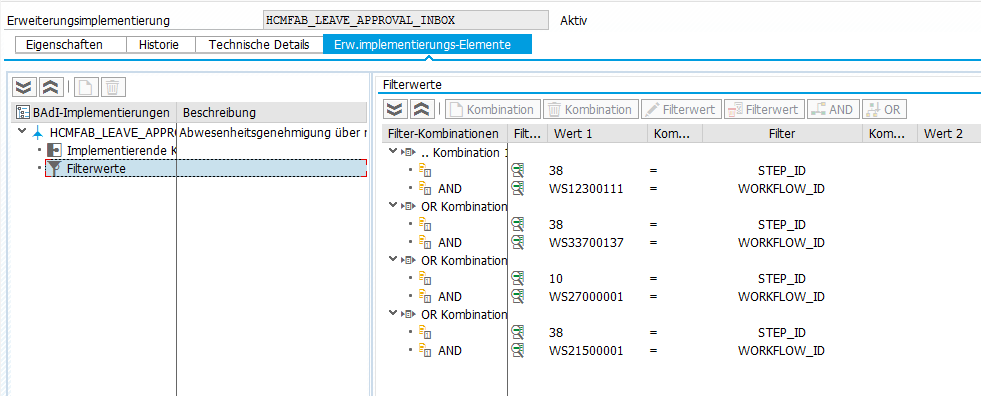
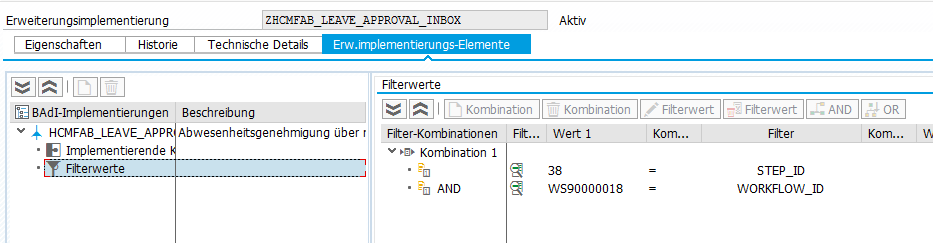
If you want to copy the standard workflow of the leave request approval process (WS12300111) and are adding another approval step (or you just want to add an escalation where you set the approve workitem to obsolete and create a new approval step for the next approver) you have to implement the following BAdI. In detail you only have to add the new step ID in the filter, else the approver will not see any approval or reject buttons in his inbox. See details here.

BAdI: /IWWRK/BADI_WF_BEFORE_UPD_IB

Default implementation: HCMFAB_LEAVE_APPROVAL_INBOX
Default Workflows and Step ID’s
Add your custom workflow and the custom approval step id in your own BAdI implementation

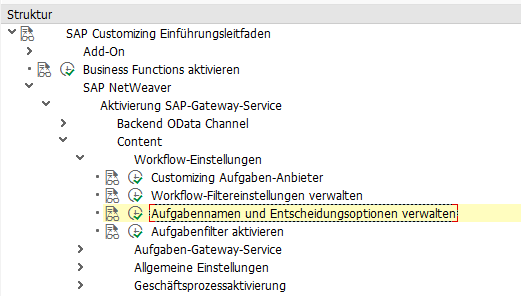
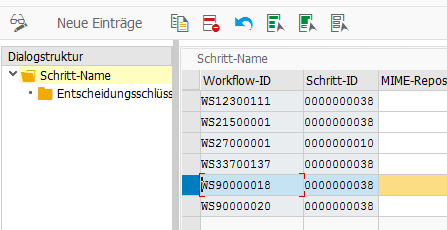
As second step you have to add the Workflow in the customizing. You’ll find further information here.

SM30 View /IWWRK/V_WFSTEP.
Add the Workflow with Approval StepId
Add the Approve and Reject Buttons