Recently, I had the task of assigning a workflow decision step to some users that were customized in a Z-Table. Normally I would have done this, by creating a container element “Actors”, a task that calls a method to return these Actors and use these Actors in the decision step. But this time I tried a custom AC Rule for the first time and I must say it was much easier than expected.
To begin, simply create a function module. The function module only needs two table parameters, AC_CONTAINER and ACTOR_TAB. They can be copied from RH_GET_ACTORS or GM_GET_RESP_FROM_INTERNAL. There you can also check, how to access the AC_CONTAINER table, if you need any input values from the WF. In my case, I just had to read the Z-Table and return the result via ACTOR_TAB.
SELECT * FROM ztable INTO TABLE @DATA(lt_table).

LOOP at lt_table INTO DATA(ls_table).
  "you can also check if the provided user exists by using function module 'SUSR_USER_CHECK_EXISTENCE'
  APPEND VALUE #( otype = 'US' objid = ls_table-userid ) TO actor_tab.
ENDLOOP.

IF lines( actor_tab ) = 0.
  RAISE nobody_found.
ENDIF.
Then simply go to tcode PFAC, create a rule, choose Type F, provide the function module and check the flag box at the end.
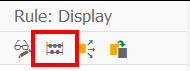
In the PFAC transaction, you can also simulate the rule resolution.
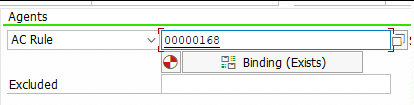
If everything works fine, add the new created rule to the decision step.
If you want to use the decision note / action comment of a Workitem in a mail step, you have to write a method to read the comment and then pass it to the mail step. To do this, I always create a method in my Workflow helper class called READ_DECISION_NOTE with the following parameters:
For the importing parameter, you must store the Workitem ID of your Decision Step in you Workflow Container, by creating a Container Element like DecisionWIID of type SWW_WIID and fill it with the Workitem ID of your decision step. Then use it later for calling your method READ_DECISION_NOTE.
Regarding the exporting parameter; If you want to send a mail via class cl_cbs you’re a fine reading the comment as string. But if you want to use the default workflow mail step, and you are expecting comments with more than >255 characters, you will need the comment as SOLI_TAB.
If you take a look at the decision Workitem, you will properly find the Attribute ACTION_COMMENTS, which is of type SWC_VALUE and is of type char with length 255. But this is only the case, if the entered text has less than < 255 characters.
If the user entered a text with more than 255 characters, the text is split and there are more elements named with ACTION_COMMENTS_1, ACTION_COMMENTS_2 etc. (Note 3017539)
There is the function module SAP_WAPI_READ_CONTAINER to read Workitems. As input for the function module, you need the Workitem ID from the decision step. You will then find the ACTION_COMMENTS in the simple_container table.
    DATA: return_code              TYPE sy-subrc,
          simple_container         TYPE TABLE OF swr_cont,
          message_lines            TYPE TABLE OF swr_messag,
          message_struct           TYPE TABLE OF swr_mstruc,
          subcontainer_bor_objects TYPE TABLE OF swr_cont,
          subcontainer_all_objects TYPE TABLE OF swr_cont,
          object_content           TYPE TABLE OF solisti1.

    " Read the work item container from the work item ID
    CALL FUNCTION 'SAP_WAPI_READ_CONTAINER'
      EXPORTING
        workitem_id              = iv_wiid
      IMPORTING
        return_code              = return_code
      TABLES
        simple_container         = simple_container
        message_lines            = message_lines
        message_struct           = message_struct
        subcontainer_bor_objects = subcontainer_bor_objects
        subcontainer_all_objects = subcontainer_all_objects.


    TRY.
        DATA(text) = simple_container[ element = 'ACTION_COMMENTS' ]-value.
      CATCH cx_sy_itab_line_not_found.
      " Check for ACTION_COMMENTS_1 etc.
      " or follow the approach below
    ENDTRY.
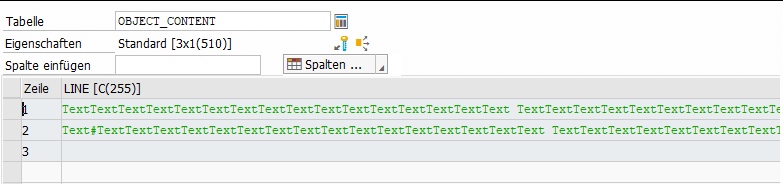
The comment is also added as SOFM-Object (SAP-Office-Document) to the Workitem. Just check the table subcontainer_all_objects, which is also returned by the previous function module, for attribute _ATTACH_COMMENT_OBJECTS (or _ATTACH_OBJECTS or DECISION_NOTE or _DECISION_COMMENT). With function module SO_DOCUMENT_READ_API1 you can then get the actual comment.
    " Read the _ATTACH_COMMENT_OBJECTS element
    " There can be more than one comment, just take the last one
    LOOP AT subcontainer_all_objects INTO DATA(comment_object) WHERE element = '_ATTACH_COMMENT_OBJECTS'.
    ENDLOOP.

    CHECK comment_object-value IS NOT INITIAL.

    " Read the SOFM Document
    CALL FUNCTION 'SO_DOCUMENT_READ_API1'
      EXPORTING
        document_id    = CONV so_entryid( comment_object-value )
      TABLES
        object_content = object_content
      EXCEPTIONS
        OTHERS         = 1.

    et_decision_note = object_content.

* Or create a single string
*    LOOP AT object_content INTO DATA(lv_soli).
*      CONCATENATE text lv_soli-line INTO text.
*    ENDLOOP.
This SOLI_TAB can be passed to a default mail step and will keep line breaks etc.
Update 02.06.2026: A shorter approach can be the following.