Homelab, Linux, JS & ABAP (~˘▾˘)~
 

[Workflow] Unbearbeitete Inbox Workitems eines Users ermitteln

Regelmäßig bekomme ich die Anfrage, wie unbearbeitete Inbox Items (offene Dialog Workitems) ermittelt und weitergeleitet werden können. Das kann zum Beispiel erforderlich sein, wenn eine Führungskraft ein Unternehmen verlässt und vorher nicht alle Workitems in der Inbox abgearbeitet hat. Diese sollen daher dann meistens der neuen Führungskraft zugewiesen werden. Es gibt verschiedene Wege diese Workitems zu ermitteln und weiterzuleiten.

  • Mit dem Fuba SAP_WAPI_CREATE_WORKLIST kann man sich den Inbox-Content zu einem User anzeigen lassen (siehe hier), meist scheitert das aber an den Berechtigungen auf der Produktion. Ist aber ein praktisches Mittel, um sich einen schnellen Überblick über die Inbox eines Users zu machen.
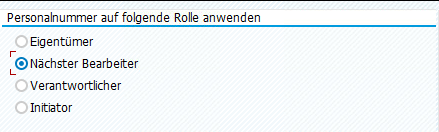
    • Geht es z.B. speziell nur um Abwesenheitsantrage, könnte man in der PTARQ schauen. Mit dem Report “Belege anzeigen” kann man dann auf die Führungskraft filtern, dazu einfach den Radiobutton “Nächsten Bearbeiter” auswählen und die Personalnummer der Führungskraft eingeben. Hier gibt es einen direkten Absprung in das Workflow-Log und man kann sich die Workitem ID des Dialogschritts über Springen → Technische Workitem-Anzeige holen, um damit in der SWIA weiterleiten zu können.

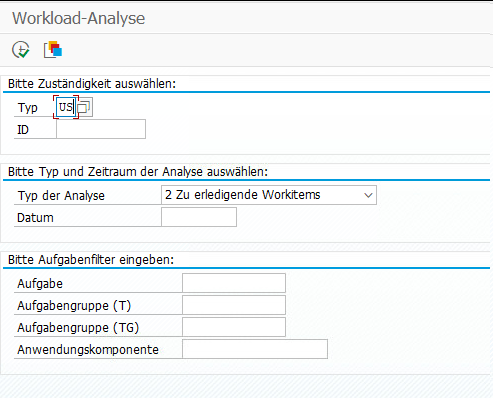
    • Ich nutze für diese Aufgabe aber vorwiegend die SWI5. Typ US auswählen + die User ID und weiter unten auf “Zu erledigende Workitems” stellen. Optional noch auf einen speziellen Aufgabentyp filtern.
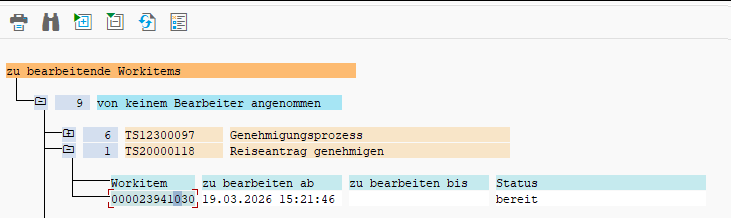
    Als Ergebnis erhält man eine Liste mit Aufgaben IDs und zugehörigen Workitem IDs. Und da es direkt die Workitem ID des Dialogschritts ist, kann man damit direkt in der SWIA selektieren und das Workitem weiterleiten.
    [Home Assistant] YAML Anker und Aliase

    In YAML werden Anker (&) und Aliase (*) verwendet, um Redundanzen zu vermeiden, indem Konfigurationsblöcke einmal definiert und an anderer Stelle wiederverwendet werden. Super praktisch!

    https://support.atlassian.com/bitbucket-cloud/docs/yaml-anchors

    definitions: 
      steps:
        - step: &build-test
            name: Build and test
            script:
              - mvn package
            artifacts:
              - target/**
    
    pipelines:
      branches:
        develop:
          - step: *build-test
        main:
          - step: *build-test
    

    Damit kann man die ein oder andere Home Assistant Konfiguration etwas verkürzen.

    [ABAP] ALV – Enable Excel Export

    The “Excel export” functionality can easily be enabled using get_functions( )->set_all( abap_true )

    SELECT * FROM sflight INTO TABLE @DATA(flights) UP TO 100 ROWS.
    
    TRY.
        cl_salv_table=>factory( IMPORTING r_salv_table = DATA(lo_salv)
                                CHANGING  t_table      = flights ).
    
        lo_salv->get_functions( )->set_all( abap_true ).
        lo_salv->get_columns( )->set_optimize( abap_true ).
        lo_salv->get_display_settings( )->set_list_header( 'Flights' ).
        lo_salv->get_display_settings( )->set_striped_pattern( abap_true ).
        lo_salv->get_selections( )->set_selection_mode( if_salv_c_selection_mode=>row_column ).
    
        lo_salv->display( ).
    
      CATCH cx_root INTO DATA(e_txt).
        WRITE: / e_txt->get_text( ).
    ENDTRY.
    

    [Fiori] MyInbox – Custom App reloads infinitely

    I recently had the situation, that after a standalone Gateway System got patched, a custom app in the My Inbox app did not load anymore, when clicking on a workitem. When opening the network tab in the dev tools, you could see three requests send over and over again. It called the manifest.json, a batch request to the OData Service and some i18n.properties calls. You could also see the app files in the sources tab, which means that app had already loaded correctly but could not be displayed because it kept restarting for some reason.

    When searching via Perplexity, I found the following post in the SCN: https://community.sap.com/t5/technology-q-a/sapui5-custom-app-navigation-from-myinbox-calls-app-in-infinite-loop/qaq-p/690650
    But moving the “parent” property did not help, although the described issue sound similar.

    Since everything worked before the system patch and the custom app wasn’t changed, it must have been related to an updated My Inbox app or to the new UI5 version, which affected the custom app.

    When scrolling through my bookmarks, I found this note: 2305401 – Integration of SAPUI5 Fiori Applications into My Inbox 2.0
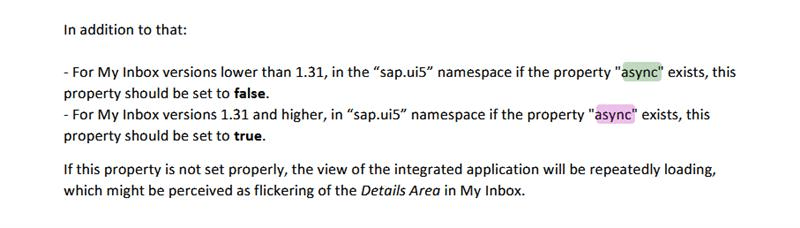
    When checking the attached PDF, I found the following in chapter 4:

    This “repeatedly loading” was exactly my problem! And since the Gateway got patched, I guess a new My Inbox version came with it. When checking the manifest.json in the custom app, there was no async property at all.
    After adding "async": true to the mainfest.json, the custom app started to load successful again. Nice!

    [HR] Personalisierungsdaten pflegen

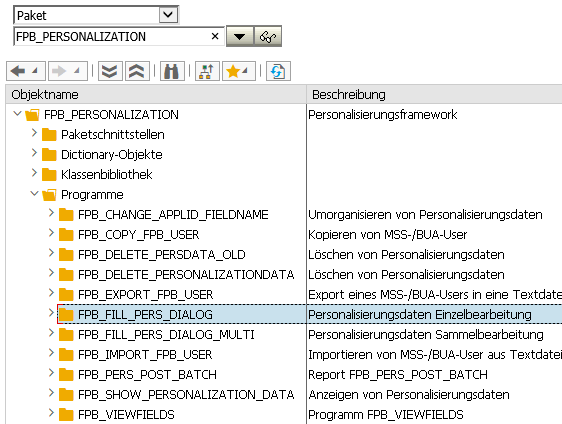
    Paket: FPB_PERSONALIZATION
    Fuba: FPB_PERS_POST_FOR_DIALOG
    Tabelle: FPB_PERSPARM

    https://launchpad.support.sap.com/#/notes/0001622954

    Beispiel: Reisebeauftragter (RBA) für das Travelmanagement via Dialog CO-CCA-TR

    Anlegen:
    Tcode FPB_MAINTAIN_PERS_S
    Dialog DIA_CO-CCA-TR

    Löschen:
    Tcode FPB_DELETE_PERS_DATA
    Dialog CO-CCA-TR

    Anzeigen:
    Tcode: FPB_SHOW_PERS_DATA

    Siehe weitere Transaktionen im Paket.

    [Firefox] Handy shortcuts I’ve learned recently

    Over the past few months, I’ve picked up a few handy Firefox tricks.

    Address Bar

    • Find open tabs: Press Ctrl + L (or Ctrl + T) to focus the address bar, then type @tabs or %, hit space, and start typing the tab’s name.
    • Search browsing history: Press Ctrl + L, type @history, hit space followed by your search term.
    • Duplicate the current tab: Focus the address bar with Ctrl + L, then press Ctrl + Shift + Enter. (It opens the same page in a new tab, but without keeping the original tab’s history.)

    Tab Management

    • Quickly duplicate a tab: Hold Ctrl and drag a tab to another spot on the tab bar, or just middle‑click the refresh button.
    • Select multiple tabs: Use Ctrl + click to select specific tabs, or Shift + click to select a whole range.
    • Move selected tabs to a new window: After selecting tabs, simply drag them out of the tab bar.

    [SAPUI5] Create app with full screen width / full screen layout

    https://experience.sap.com/fiori-design-web/full-screen/

    https://stackoverflow.com/questions/55832369/how-to-disable-or-enable-letterboxing-and-adjust-ui5-for-the-widescreen/56137602

    Simply add appWidthLimited:false in your index.html

    		<script>
    			sap.ui.getCore().attachInit(function() {
    					new sap.m.Shell({
    						appWidthLimited:false,
    						app: new sap.ui.core.ComponentContainer({
    							height : "100%",
    							name : "my.demo.app"
    						})
    					}).placeAt("content");
    				);
    			});
    		</script>
    

    [ABAP] Debugging as other user

    Imagine the following situation:

    USER_A: Allowed to run a specific report, but not allowed to debug
    USER_B: Is allowed to debug

    In such a case, you can do the following:

    • USER_B: Sets external breakpoint for USER_A
    • USER_A: Enters the following in the command field: /hext user=USER_B
    • USER_A: Starts his report
    • USER_B: Debugger will be opened

    If you check SY-UNAME in the debugger, it will have the value USER_A

    [ABAP] ALV icon

    Demo program: SALV_DEMO_TABLE_COLUMNS

    TYPES: BEGIN OF ty_log,
             icon TYPE icon-id,
           END OF ty_log.
    
    DATA lt_log TYPE TABLE OF ty_log.
    
    lt_log = VALUE #( ( icon = icon_okay    )
                      ( icon = icon_cancel  ) ).
    
    TRY.
        cl_salv_table=>factory( IMPORTING r_salv_table = DATA(alv_table)
                                CHANGING  t_table      = lt_log ).
    
        alv_table->display( ).
    
      CATCH cx_salv_msg.
    ENDTRY.
    

    [Fiori] Creating a Launchpad Plugin using BAS

    Since there is no Wizard anymore for creating a Launchpad Plugin, as there was in WebIDE, you have to create it manually. The following two guides helped me create a Launchpad Plugin in BAS from scratch:
    https://github.com/SAP-samples/fiori-custom-plugin-abap/tree/main
    https://github.com/SAP-samples/launchpad-service-samples
    In my scenario, I had to deploy to a normal S/4 HANA system, so I skipped all the Steampunk or WorkZone parts.

    In the first sample, for some reason they use jQuery to call an OData Service, in the second sample no OData is called at all. But of course, an OData Service can be used in a Plugin the same way as you do in every other Fiori App. You just have to add your service in the manifest.json like you would normally do:

      "sap.app": {
        ...
        "dataSources": {
          "ZFLP_TEST_SRV": {
            "uri": "/sap/opu/odata/sap/ZFLP_TEST_SRV",
            "type": "OData",
            "settings": {
              "odataVersion": "2.0",
              "localUri": "localService/metadata.xml"
            }
          }
        }
      },
      ...
      "sap.ui5": {
        ...
        "models": {
          "": {
            "dataSource": "ZFLP_TEST_SRV",
            "preload": true,
            "settings": {
              "defaultCountMode": "Inline",
              "metadataUrlParams": {
                "sap-documentation": "heading"
              }
            }
          }
        }
    

    And for i18n

      "sap.ui5": {
         ...
        "models": {
          "i18n": {
            "type": "sap.ui.model.resource.ResourceModel",
            "settings": {
              "bundleName": "ne.flp.plugin.flp_my_plugin.i18n.i18n"
            }
          }
        }


    To activate the deployed Plugin, use these transactions:

    • /ui2/flp_conf_def → Define FLP Plugins → Create new entry
    • /ui2/flp_sys_conf → Make Plugin available system-wide
    • /ui2/flp_cus_conf → Make plugin available in specific clients
    • /ui2/flp → open Fiori Launchpad to test plugin