When developing a report that should also write logs (SLG1), I normaly use the class CL_BAL_LOGOBJ as described here. When using method lo_log->display( ) it displays the result in a popup. If you want to display the log as ALV some more logic is neede.
DATA ls_display_profile TYPE bal_s_prof.

TRY.
    DATA(lo_log) = NEW cl_bal_logobj(
      i_log_object        = 'Z_MY_LOG'
      i_default_subobject = 'GENERAL' ).

    lo_log->add_statustext( i_statustext = 'Processing started' ).

    lo_log->add_errortext( i_errortext = 'An error occurred during processing' ).

    CALL FUNCTION 'BAL_DSP_PROFILE_NO_TREE_GET'
      IMPORTING
        e_s_display_profile = ls_display_profile.

    ls_display_profile-use_grid = abap_true.

    lo_log->display( i_disp_profile = ls_display_profile ).

  CATCH cx_bal_exception INTO DATA(lx_bal).
    MESSAGE lx_bal->get_text( ) TYPE 'I'.
ENDTRY.
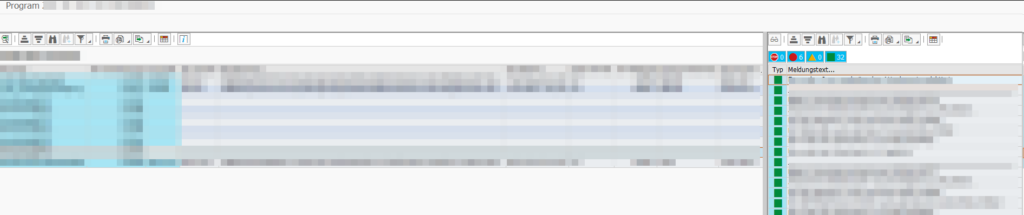
In my case, I wanted to display the log next to the actual output of a report, so that I have my data result on the left side, and the application log on right side.
*--------------------------------------------------------------------*
* Create Split Container
*--------------------------------------------------------------------*

    " Create a splitter on default_screen
    DATA(o_splitter_main) = NEW cl_gui_splitter_container( parent                  = cl_gui_container=>default_screen
                                                           no_autodef_progid_dynnr = abap_true
                                                           rows                    = 1
                                                           columns                 = 2 ).

    " Width of left splitter in %
    o_splitter_main->set_column_width( id = 1 width = 75 ).

    " Get the ref from the left and right split containers
    DATA(o_container_1) = o_splitter_main->get_container( row = 1 column = 1 ).
    DATA(o_container_2) = o_splitter_main->get_container( row = 1 column = 2 ).

*--------------------------------------------------------------------*
* 1 ALV Output
*--------------------------------------------------------------------*

    TRY.
        cl_salv_table=>factory( EXPORTING r_container  = o_container_1
                                IMPORTING r_salv_table = DATA(o_salv)
                                CHANGING  t_table      = lt_sflight).
        o_salv->display( ).

      CATCH cx_salv_msg.
      CATCH cx_salv_not_found.
    ENDTRY.

*--------------------------------------------------------------------*
* 2 BAL Log
*--------------------------------------------------------------------*

    DATA ls_display_profile TYPE bal_s_prof.
    DATA lv_control_handle  TYPE balcnthndl.

    DATA(lt_log_handles) = VALUE bal_t_logh( ( mo_log->if_bal_logger~mv_loghandle ) ).

    CALL FUNCTION 'BAL_DSP_PROFILE_NO_TREE_GET'
      IMPORTING
        e_s_display_profile = ls_display_profile.

    ls_display_profile-use_grid = abap_true.

    " Increase the width of the message text column
    LOOP AT ls_display_profile-mess_fcat ASSIGNING FIELD-SYMBOL(<ls_fcat>)
         WHERE ref_table = 'BAL_S_SHOW'
           AND ref_field = 'T_MSG'.
      <ls_fcat>-outputlen = 200.
    ENDLOOP.

    CALL FUNCTION 'BAL_CNTL_CREATE'
      EXPORTING
        i_container          = o_container_2
        i_s_display_profile  = ls_display_profile
        i_t_log_handle       = lt_log_handles
      IMPORTING
        e_control_handle     = lv_control_handle
      EXCEPTIONS
        profile_inconsistent = 1
        internal_error       = 2
        OTHERS               = 3.

  ENDMETHOD.

*--------------------------------------------------------------------*
*  Force output
*--------------------------------------------------------------------*
    WRITE: space.
I really like the result