Homelab, Linux, JS & ABAP (~˘▾˘)~
 

[SuccessFactors] Check if IAS is activated for a tenant

Go to Upgrade Center, select Platform in the Filter By Dropdown. In the Optional Upgrades Column, search for:

Initiate the SAP Cloud Identity Services Identity Authentication Service Integration

If the entry exists, IAS is not yet set up. If it does not exist, the IAS configuration is probably already done.

[Cloud Identity Services] Assign SuccessFactors user to IAS group via transformation

Source System: SuccessFactors
Target System: Identity Authentication

To assign employees to specific IAS groups, that transformation for the target (in this case the IAS) must be adjusted.

When using ias.api.version 1

https://blogs.sap.com/2021/03/29/ias-integration-with-sap-successfactors-application-2-sync-users-using-identity-provisioning-serviceips/

            {
                "condition": "$.emails[0].value =~ /.*@abc.com.*/",
                "constant": "DEV_IDP1",
                "targetPath": "$.groups[0].value"
            },
            {
                "condition": "$.emails[0].value =~ /.*@def.com.*/",
                "constant": "DEV_AzureAD",
                "targetPath": "$.groups[1].value"
            },

When using ias.api.version 2

https://help.sap.com/docs/identity-provisioning/identity-provisioning/enabling-group-assignment

         {
            "condition":"($.emails EMPTY false)",
            "constant":[
               {
                  "id":"00f8ab94-a732-48fa-9169-e51f87b8dcd5"
               },
               {
                  "id":"01231139-4711-4a28-8f9d-6745843ef716"
               }
            ],
            "targetVariable":"assignGroup"
         }

Update 10.03.2026: If you want to use an SF field, that is currently not synced, it must be added on the source system sync. First on the Properties tab on sf.user.attributes and then it can be used in the transformation of the source system (in this case SF).

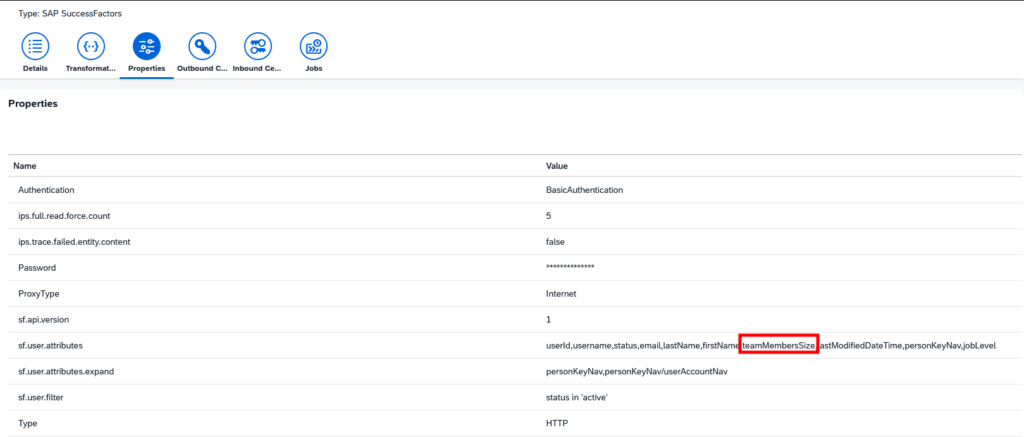
            {
                "sourcePath": "$.teamMembersSize",
                "targetPath": "$['urn:sap:cloud:scim:schemas:extension:sfsf:2.0:User']['teamMembersSize']"
            },