Homelab, Linux, JS & ABAP (~˘▾˘)~
 

[HR] My Overtime Requests

Here are the notes I took while investigating SAP’s relatively ‘new’ overtime apps.

SAP Fiori for SAP Business Suite
My Overtime Requests (Fiori 2.0)
Approve Overtime Requests (Fiori 2.0)

SAP S/4HANA
My Overtime Requests (Fiori 2.0)
Approve Overtime Requests (Fiori 2.0)

SAP Fiori Apps Reference Library
F4939
F4937

Component:
PA_FIO_OVT

Packages:
– PAOC_TIM_OVERTIMEQTA_REQ_CORE (Mein Mehrarbeitskontingent: Core-Funktionen)
– PAOC_TIM_OVERTIMEQTA_REQ_UIA (UIA = User Interface Adapter)
– PAOC_TM_TIMEDATE_REQ_CORE (Zeitdatenanforderung: Core-Funktionen)
– ODATA_HCMFAB_MYOVERTIMEQUOTA
– HCM_FAB_MYOVERTIMEQUOTA (contains BSP HCMFAB_OT_MAN)
– HCM_FAB_APPROVE_OVERTIME (contains BSP HCMFAB_OTQ_APR)

Reports
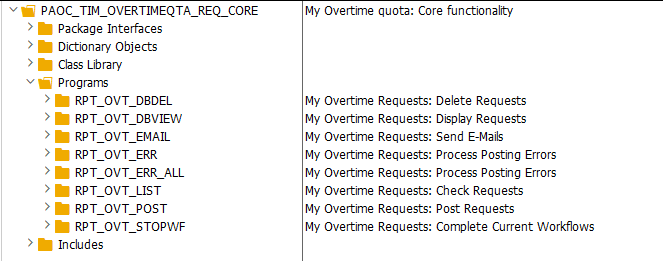
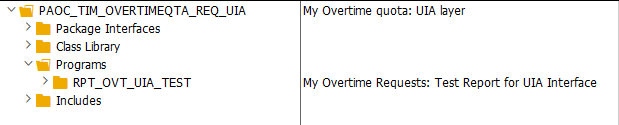
Using RPT_OVT_UIA_TEST, you can simply simulate Overtime Requests in the backend to test your customizing.
Jobs

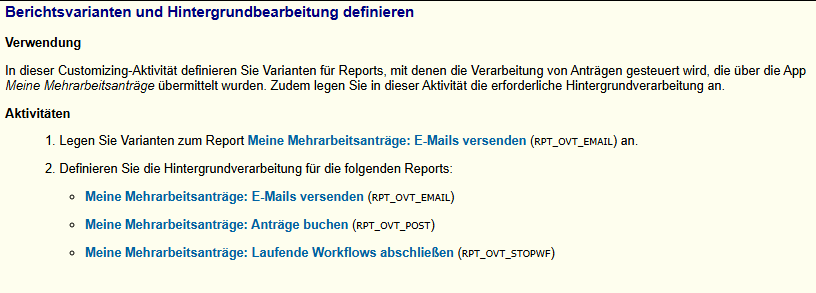
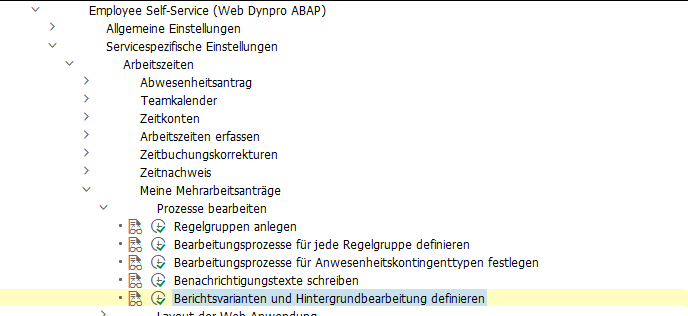
It is recommended to run the reports RPT_OVT_EMAIL, RPT_OVT_POST and RPT_OVT_STOPWF as a job.
OData
– HCMFAB_MYOVERTIMEQUOTA_SRV (service name)
– HCMFAB_MYOVERTIMEQUOTA (SEGW Project)

Workflow
– WS02400057 (PT_OVTREQ)

Cluster Tables
– PTREQ_HEADER
– PTREQ_ITEMS
– PTREQ_ACTOR
– PTREQ_NOTICE

On Behalf of” is supported
2806560

Customizing
SPRO → Personnel Management → Employee Self-Service (Web Dynpro ABAP)  → Service-Specific Settings →  Working Time → My Overtime Requests.

Adjusting the Fiori UI

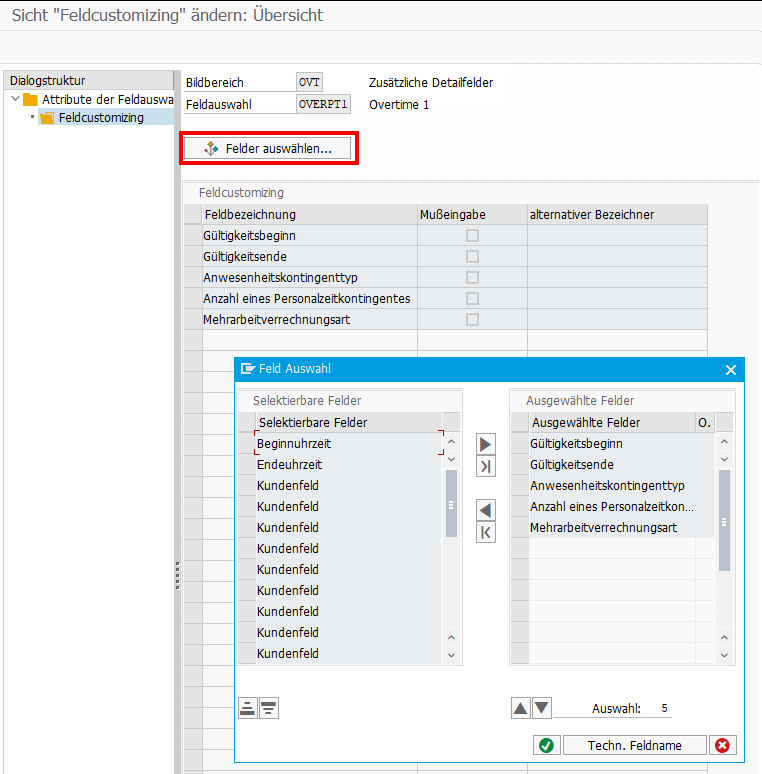
If you want to hide fields in the Fiori frontend, or you want to adjust some labels, you can simply do this via Customizing:
My Overtime Requests → Layout of the Web Application → Define Field Selection
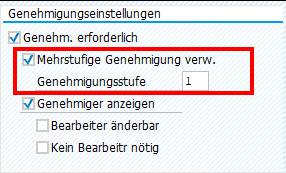
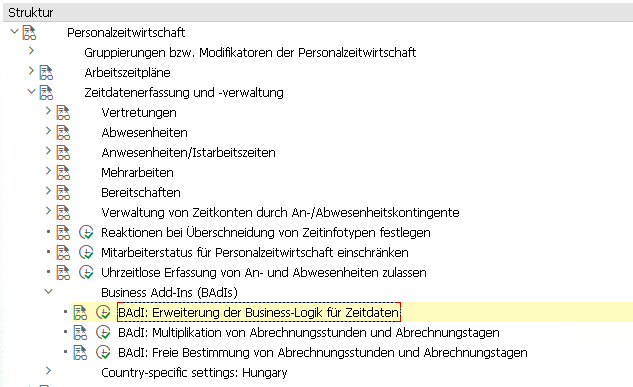
Multi-Level Approval for Time Data Requests (HRPT_B_TMD_MULTI_APPROVERS)

The BAdI is called when opening the My Overtime Request App and a second time when clicking on the New Button to create a new OVT request. It’s not triggered when sending the request, what I initially expected.
To reuse the code from the sample class,

*    "Determine approver level
*    DATA(cust_key_request_fields) = VALUE cl_hrpt_ovt_const=>ovt_cust_key_request_fields( pernr = iv_pernr
*                                                                                          ktart = iv_subtype
*                                                                                          date  = is_request_period-start_date ).
*    TRY.
*        DATA(approval_settings) = cl_hrpt_ovt_cust_factory=>get_customizing_reader( )->get_approval_settings( REF #( cust_key_request_fields ) ).
*      CATCH cx_hrpt_tmd.
*        RETURN.
*    ENDTRY.
*    IF approval_settings-use_multiple_approver = abap_false.
*      RETURN.
*    ENDIF.

....

*    "If no last approvers exist, use line manager, HR BP and HR Admin by default
*    CALL FUNCTION 'BAPI_GET_LINE_MANAGER'
*      EXPORTING
*        im_objid       = iv_pernr
*      IMPORTING
*        es_approver    = line_manager
*        ev_has_manager = approver_exists.
*    IF approver_exists = abap_true.
*      last_seqnr = last_seqnr + 1.
*      line_manager-seqnr = last_seqnr.
*      APPEND line_manager TO rt_approver_tab.
*      IF lines( rt_approver_tab ) >= approval_settings-approver_level.
*        RETURN.
*      ENDIF.
*    ENDIF.

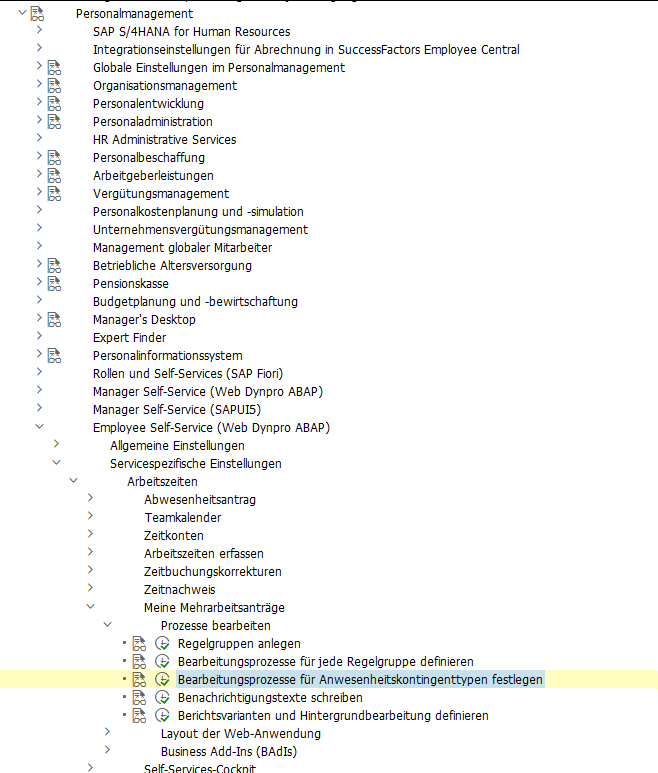
you have to set the amount of approval steps in the customizing.
Also, a Filter must be set for the BAdI:

When you run into a permission issue when opening an overtime request in MyInbox, take a look in the HCMFAB_COMMON BAdI. Perhaps the GET_CONFIGURATION method must be implemented

  method if_ex_hcmfab_common~get_configuration.

    ev_hide_employee_picture     = abap_false.
    ev_hide_employee_number      = abap_false.
    ev_hide_ce_button            = abap_false.
    ev_enable_onbehalf           = abap_false.
    ev_show_empl_number_wo_zeros = abap_false.

* On_behalf is switched off by default for compatibility reasons
* To activate it for all users who are mangers the following code could be used:

    case iv_application_id.
      when gc_application_id-myovertimequota.
        ev_enable_onbehalf = boolc( go_employee_api->is_manager( iv_application_id = iv_application_id
                                                                 iv_pernr          = iv_employee_number ) = abap_true ).
    endcase.

* In case that on behalf is active, transfer all data to the frontend. This is faster for small number of employees.
* The backend search would only transfer the visible employees to the frontend, at the cost of multiple smaller requests.

    ev_use_onbehalf_backend_search = abap_false.

  endmethod.

Custom Workflow

If you want to replace the default Workflow WS02400057 (PT_OVTREQ) with a custom one, you must adjust the customizing (as described here for the standard WF), and you’ll need to create a new BAdI Implementation for /IWWRK/ES_WF_WI_BEFORE_UPD_IB analog HCMFAB_MYOTQ_APPROVAL_INBOX to get the Approve and Rejects Buttons working by providing the Workflow-ID and decision Step-ID.

Extensibility

Although it should be possible to extend both Fiori Apps via Adaptation Projects, I was unable to do so. Either it’s a problem with the new adaption editor, which got new released while writing the blog, or it is a problem with the apps itself. Whatever I tried, I was always running in issues.

Therefore, I did it the “classic” way and created an Extension Project and used the provided Extension Points. For the Approval App, I was unable to preview the application directly in BAS, perhaps because it is only an Inbox integration and does not run standalone. I therefore always had to deploy, to test my changes.
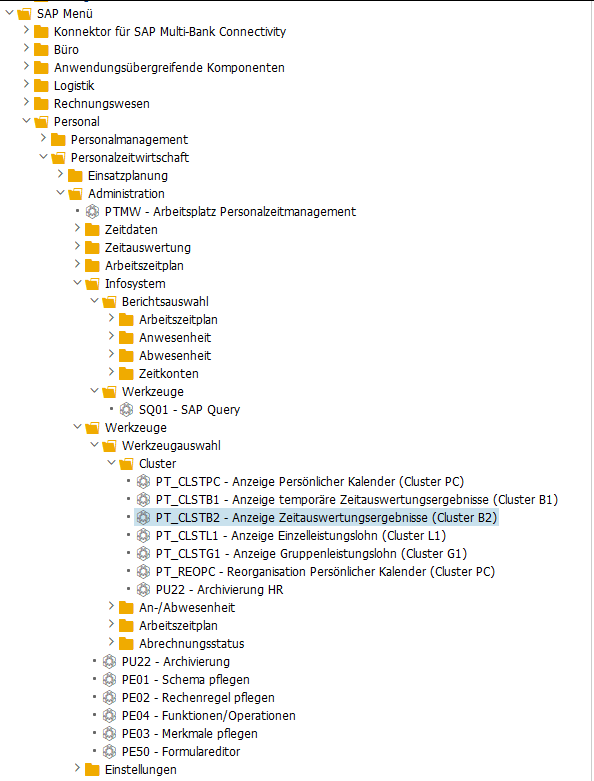
[HR] Anzeige Zeitauswertungsergebnisse (Cluster B2) – Zeitsalden kumuliert (SALDO)

PT_CLSTB2 → SALDO

Report: RPCLSTB2 – Anzeige Zeitauswertungsergebnisse (Cluster B2)

DATA pernr TYPE pernr_d.
DATA saldo TYPE TABLE OF pc2b5.

CALL FUNCTION 'HR_TIME_RESULTS_GET'
  EXPORTING
    get_pernr             = pernr
    get_pabrj             = CONV pabrj( sy-datum(4) )
    get_pabrp             = CONV pabrp( sy-datum(6) )
  TABLES
    get_saldo             = saldo
  EXCEPTIONS
    no_period_specified   = 1
    wrong_cluster_version = 2
    no_read_authority     = 3
    cluster_archived      = 4
    technical_error       = 5
    OTHERS                = 6.
IF sy-subrc <> 0.
* Implement suitable error handling here
ENDIF.

Um direkt für mehrere Perioden zulesen, diesen Baustein verwenden:

DATA: time_results TYPE TABLE OF ptm_time_results.

  CALL FUNCTION 'HR_TIME_RESULTS_IN_INTERVAL'
    EXPORTING
      int_pernr             = pernr-pernr
      int_begda             = pn-begda
      int_endda             = pn-endda
    TABLES
      int_time_results      = time_results
    EXCEPTIONS
      no_period_specified   = 1
      wrong_cluster_version = 2
      no_read_authority     = 3
      cluster_archived      = 4
      technical_error       = 5
      OTHERS                = 6.

[ABAP] Read personnel area with text

  DATA p0001 TYPE p0001.
  cl_hcmfab_utilities=>read_infotype_record( EXPORTING iv_pernr = pernr
                                                       iv_infty = '0001'
                                             IMPORTING es_pnnnn = p0001 ).
  DATA(personnel_area_id)   = p0001-werks.
  DATA(personnel_area_text) = cl_hr_t500p=>read( p0001-werks )-name1.

Or using the class CL_HCMFAB_EMPLOYEE_API.

  DATA(lv_employee_details) = cl_hcmfab_employee_api=>get_instance( )->get_employee_details( iv_pernr          = pernr
                                                                                             iv_application_id = if_hcmfab_constants=>gc_application_id-mypersonaldata ).
  DATA(personnel_area_id)   = lv_employee_details-personnel_area_id.
  DATA(personnel_area_text) = lv_employee_details-personnel_area_text.

[HR] TMW – Time-Manager-Workplace BAdI

Transaktion: PTMW
BAdI: PT_BLP_USER

Badi Implementierung anlegen und Filter-Ausprägungen hinzufügen. Es muss für jede benötigte Filter-Ausprägung eine eigene BAdI Implementierung und Klasse angelegt werden.

Klasse anlegen und in der Interface Methode die Kundenlogik, wie in der Dokumentation empfohlen, in eine private Methode kapseln.
Bsp.:

  METHOD if_ex_pt_blp_user~process_data.


    CHECK i_record IS BOUND.

    IF  i_record->data->category = cl_pt_tmw_tdm_const=>cat_infty
    AND i_record->data->type     = '2001'.

      "hier die erforderliche Logik rein, z.B. weitere Prüfungen
      process_it2001( EXPORTING i_record    = i_record            " Aktueller Satz
                                i_time_data = i_time_data         " Aktuelle Zeitdaten
                      IMPORTING e_messages  = e_messages          " Ausgabemeldungen für die Transaktion
                                e_time_data = e_time_data   ).    " Neue und geänderte Daten

      "An den konkreten Infotypsatz kommt man z.B. folgendermaßen:
      DATA(record_data) = CAST cl_pt_td_it2001( i_record->data ).
      DATA(p2001)       = record_data->if_pt_td_it2001~p2001.

    ENDIF.


  ENDMETHOD.

[ABAP] OM – Lese Personen auf und unterhalb einer OE

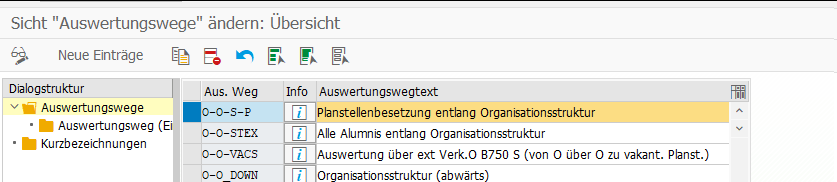
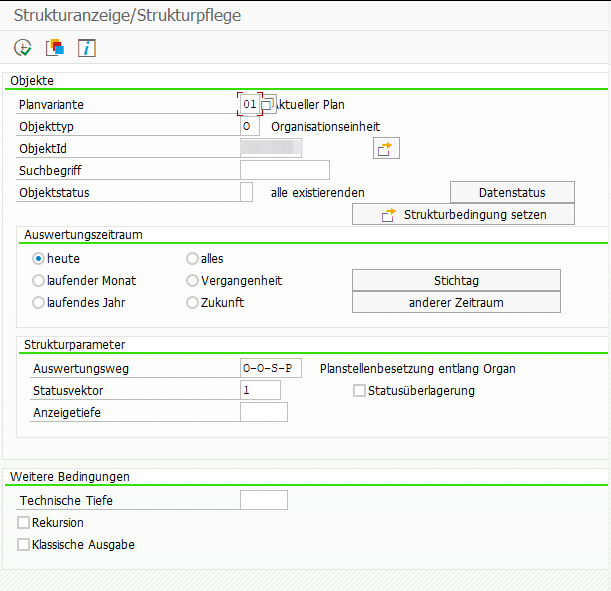
Auswertungsweg O-O-S-P liefert unter einer gegebenen Org. Einheit alle Personen, auch aus tieferen OE.

T-Code: OOAW

    DATA(lt_actor) = VALUE tswhactor( ).
    CALL FUNCTION 'RH_STRUC_GET'
      EXPORTING
        act_otype       = 'O'
        act_objid       = lv_oe " die Org. Einheit, von der gestartet werden soll
        act_wegid       = 'O-O-S-P'
        act_plvar       = '01'
        act_begda       = sy-datum
        act_endda       = sy-datum
        act_tflag       = space
        act_vflag       = space
        authority_check = space
      TABLES
        result_tab      = lt_actor
      EXCEPTIONS
        no_plvar_found  = 1
        no_entry_found  = 2
        OTHERS          = 3.
    IF sy-subrc <> 0.
      " do error handling
    ENDIF.

    " Nur Pernr's relevant
    DELETE lt_actor WHERE otype <> 'P'.
    " Doppelte Pernr's entfernen
    DELETE ADJACENT DUPLICATES FROM lt_actor.

Zum Testen des Auswertungsweges kann man den Report RHSTRU00 verwenden. Einfach Planvariante, Objekttyp und eine ObjektId einer Org. Einheit eingeben, sowie den Auswertungsweg und Statusvektor 1 (aktiv).

[HR] Infotype – add PBO or PAI logic

There are many ways to add custom logic when processing an Infotype. Here are just a few:

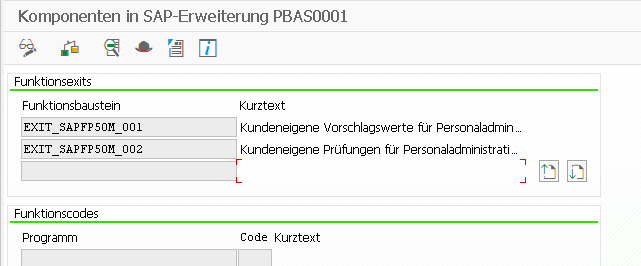
SMOD
PBAS0001
PBAS0002

ZXPADU01 – when an infotype is called
ZXPADU02 – when an action is performed on an infotype

https://regotz.jimdofree.com/abap/dynpro/infotypen-pai-pbo/

BAdI’s

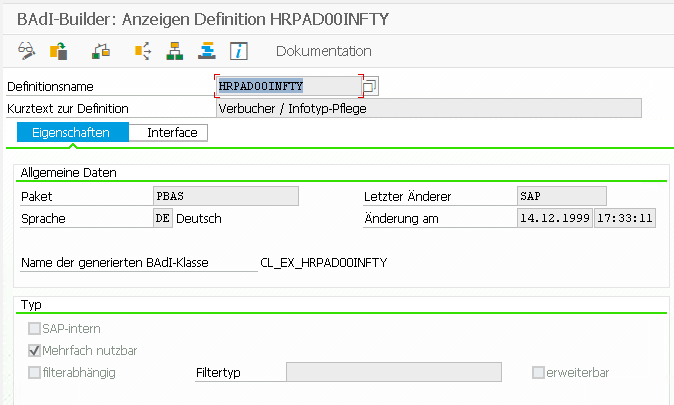
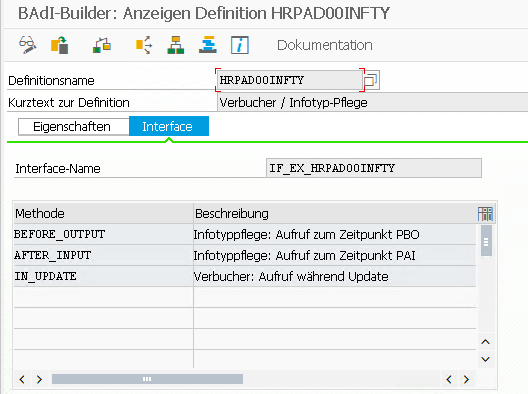
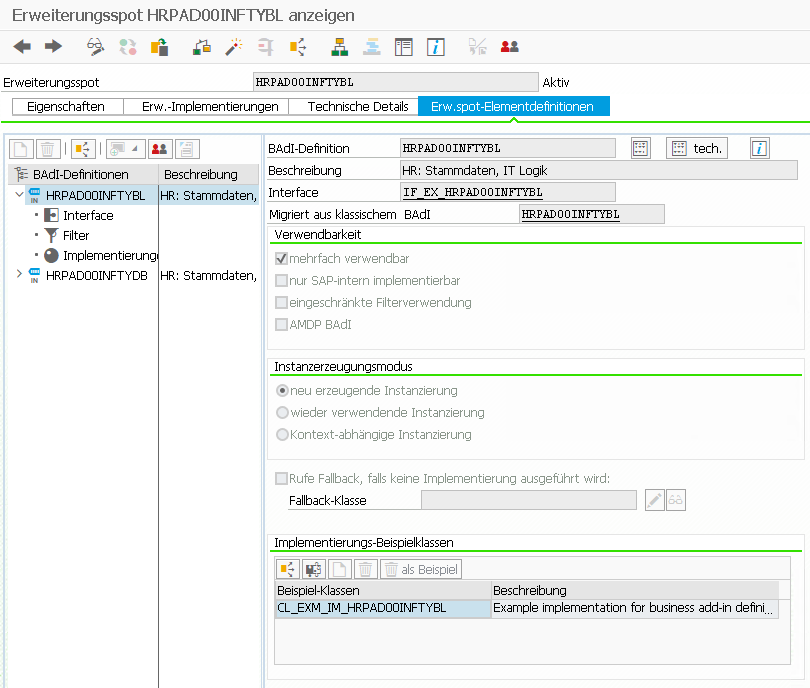
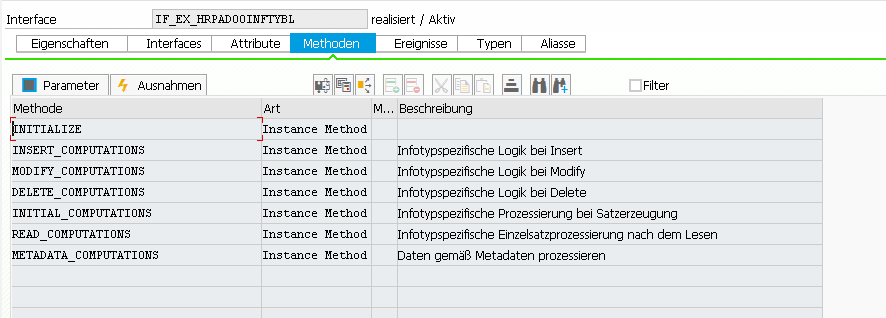
  • HRPAD00INFTY (method IN_UPDATE) is called by the old infotype framework (PA30, SAP50UPR)
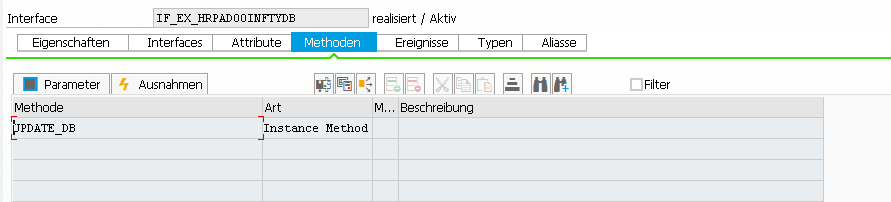
  • HRPAD00INFTYDB (method UPDATE_DB) is called in the decoupled infotype framework

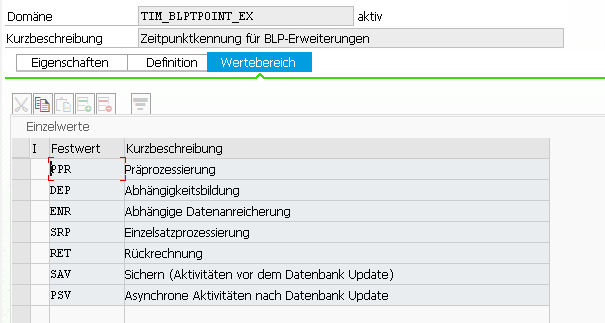
BAdI: HRPAD00INFTY – Verbucher / Infotyp-Pflege

This image has an empty alt attribute; its file name is image-1.png

This image has an empty alt attribute; its file name is image-2.png
Interface: IF_EX_HRPAD00INFTY

BAdI: HRPAD00INFTYDB – HR: Stammdaten, Infotype DB Update Logik

“The BAdI is called, after the decoupled infotype framework writes the infotype data to the database. This is done during method FLUSH.”
Note: The Infotypes 2000-2999 are not decoupled yet! More here and here.

IF_EX_HRPAD00INFTYBL
IF_EX_HRPAD00INFTYDB

[HR] Abrechnungsergebnisse lesen

Reports:

RPCALCD0 – Abrechnungsprogramm Deutschland (Name des HR-Formulars lässt sich über T-Code HRFORMS ermitteln)
RPCLSTRD – Anzeige des Clusters RD (Abrechnungsergebnisse Deutschland), Tcode: PC_PAYRESULT
H99_DISPLAY_PAYRESULT – Anzeigen von Abrechnungsergebnissen
H99CWTR0 – Lohnarten-Reporter, Tcode: PC00_M99_CWTR_NO_OC

Abrechnungsergebnistabelle:

Eine sehr schöne Übersicht über die Tabellen: https://l3consulting.de/die-tabellen-im-abrechnungscluster-des-sap-hcm-verstehen/
Die Tabelle RT enthält die Ergebnislohnarten der ausgewählten Abrechnungsperiode. (RT_ = komprimierte Darstellung)

Funktionsbausteine:

HR_GET_PAYROLL_RESULTS – Lesen von Abrechnungsergebnissen für Monats- und Jahresreports
PYXX_READ_PAYROLL_RESULT – Generischer Import von Abrechnungsergebnissen
HRCM_PAYROLL_RESULTS_GET – Abrechnungsdaten einer Person ermitteln

Hinweise zu Bausteinen: https://blog.hr-manager.de/2011/09/abap-abrechnungsergebnisse-lesen-per.html

Logische Datenbank:

Eine weitere Möglichkeit ist die Nutzung der logischen Datenbank PNP. Die Verwendung logischer Datenbanken ist in den meisten anderen Modulen obsolet, im HR Umfeld aber noch stark verbreitet.

*&---------------------------------------------------------------------*
*& Report  ZGETPAYROLL
*& Eigenschaften: Selektionsbildvariante 900, HR-Reportklasse PY_DEF.
*&---------------------------------------------------------------------*
*&
*&
*&---------------------------------------------------------------------*

REPORT  ZGETPAYROLL.

TABLES: PERNR, PYORGSCREEN, PYTIMESCREEN.

INFOTYPES: 0002.

NODES: PAYROLL TYPE PAYDE_RESULT.

START-OF-SELECTION.

GET PERNR.

RP_PROVIDE_FROM_LAST P0002 SPACE PN-BEGPS PN-ENDPS.

WRITE:/ PERNR-PERNR, P0002-VORNA, P0002-NACHN.

GET PAYROLL.

  LOOP AT PAYROLL-INTER-RT INTO DATA(WA_RT).
    WRITE:/ WA_RT-LGART, WA_RT-BETRG.
  ENDLOOP.

END-OF-SELECTION.

Oder in Kombination mit einem Fuba:

*&---------------------------------------------------------------------*
*& Report  ZGETPAYROLL
*& Eigenschaften: HR-Reportklasse __M00001.
*&---------------------------------------------------------------------*
*&
*&
*&---------------------------------------------------------------------*

REPORT ZGETPAYROLL.

TABLES: pernr.               "Necessary for get pernr

INFOTYPES: 0001,             "Organisatorische Zuord
           0002,             "Daten zur Person
           0006,             "Anschrift
           0057.             "Mitgliedschaften

DATA: l_payroll_result TYPE payat_result OCCURS 0 WITH HEADER LINE.


START-OF-SELECTION.

GET pernr.

rp_provide_from_last p0001 '' pn-begda pn-endda.

CALL FUNCTION 'HR_GET_PAYROLL_RESULTS'
    EXPORTING
      pernr                         = pernr-pernr
      permo                         = pn-permo
      pabrj                         = pn-pabrj
      pabrp                         = pn-pabrp
      actual                        = space         "X actual, ' ' retro-differences
      waers                         = 'EUR'
    TABLES
      result_tab                    = l_payroll_result
    EXCEPTIONS
      no_results                    = 0
      wrong_structure_of_result_tab = 2
      OTHERS                        = 4.
  IF sy-subrc NE 0.
    RETURN. "nächste Pernr
  ENDIF.