I recently had the situation, that after a standalone Gateway System got patched, a custom app in the My Inbox app did not load anymore, when clicking on a workitem. When opening the network tab in the dev tools, you could see three requests send over and over again. It called the manifest.json, a batch request to the OData Service and some i18n.properties calls. You could also see the app files in the sources tab, which means that app had already loaded correctly but could not be displayed because it kept restarting for some reason.
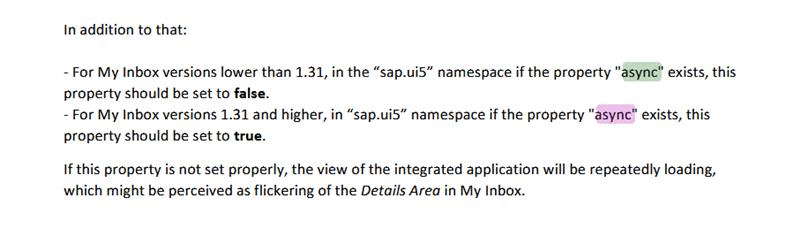
Since everything worked before the system patch and the custom app wasn’t changed, it must have been related to an updated My Inbox app or to the new UI5 version, which affected the custom app.
This “repeatedly loading” was exactly my problem! And since the Gateway got patched, I guess a new My Inbox version came with it. When checking the manifest.json in the custom app, there was no async property at all. After adding "async": true to the mainfest.json, the custom app started to load successful again. Nice!
Over the past few months, I’ve picked up a few handy Firefox tricks.
Address Bar
Find open tabs: Press Ctrl + L (or Ctrl + T) to focus the address bar, then type @tabs or %, hit space, and start typing the tab’s name.
Search browsing history: Press Ctrl + L, type @history, hit space followed by your search term.
Duplicate the current tab: Focus the address bar with Ctrl + L, then press Ctrl + Shift + Enter. (It opens the same page in a new tab, but without keeping the original tab’s history.)
Tab Management
Quickly duplicate a tab: Hold Ctrl and drag a tab to another spot on the tab bar, or just middle‑click the refresh button.
Select multiple tabs: Use Ctrl + click to select specific tabs, or Shift + click to select a whole range.
Move selected tabs to a new window: After selecting tabs, simply drag them out of the tab bar.