
Homelab, Linux, JS & ABAP (~˘▾˘)~
 

[SAPUI5] Replace OData Service manually in Extension Project

After redefining an OData Service like it is described here, you also have to add your new service in your Extension Project, so that the App knows, that it should use your redefined service instead of the default one. In the WebIDE there was a wizard that helped you with this task. In BAS there is also a wizard, but only for Adaptions Projects. For a classic extension project, there is no wizard anymore, and you have to manually add your new service to the manifest.json. But it is quite simple. You have to add your new service as data source and then also as a model. When no model name is provided, it will be used as default model.

	"sap.app": {
		"dataSources": {
			"ZMY_NEW_SERVICE": {
				"uri": "/sap/opu/odata/sap/ZHCMFAB_LEAVE_REQUEST_SRV/",
				"type": "OData",
				"settings": {
					"odataVersion": "2.0",
					"localUri": "localService/metadata.xml"
				}
			}
		}
	"sap.ui5": {
		"models": {
			"": {
				"dataSource": "ZMY_NEW_SERVICE",
				"preload": true,
				"settings": {
					"defaultBindingMode": "TwoWay",
					"useBatch": true,
					"refreshAfterChange": false,
					"disableHeadRequestForToken": true,
					"defaultCountMode": "Inline",
					"metadataUrlParams": {
						"sap-documentation": "heading"
					}
				}
			}
		}
	},
[SAPUI5] Extension vs Adaption Project

I was wondering for quite some time, what the difference is between Extension Projects and Adaptions Projects. In the comments to this blog post, I finally found the answer from Oliver Graeff:

Adaptation projects are one of the capabilities of SAPUI5 flexibility, which lets developers, key users and end users adapt/extend SAPUI5 applications. Adaptation projects are the go-to solution for developer adaptation in SAPUI5 and are the ‘next-generation’ extension projects. Using the concepts of SAPUI5 flexibility, adaptation projects offer many more possibilities, such as extending SAP Fiori elements applications or extending apps without pre-defined extension points.

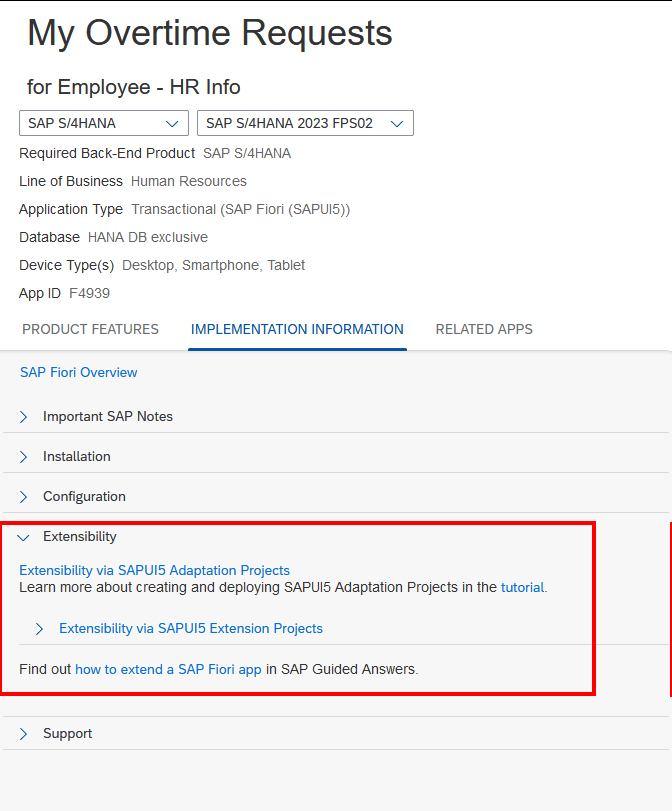
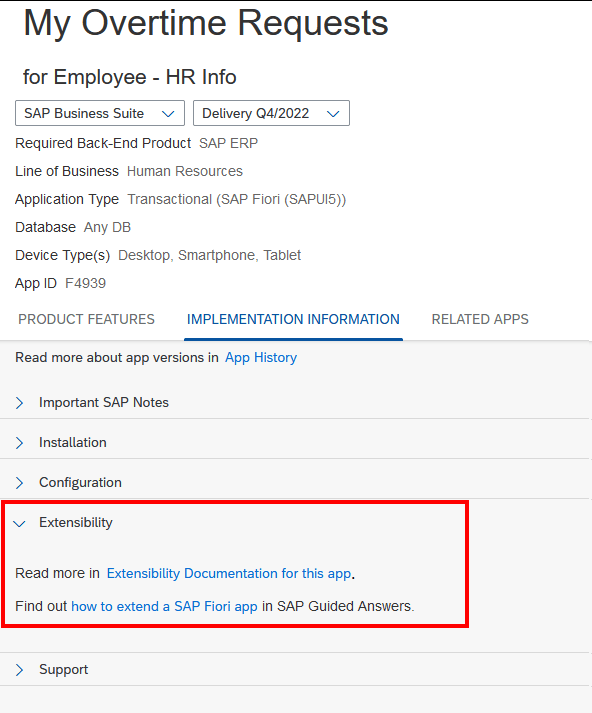
To check for a specific application, what the recommended extension approach is, simply go to the Fiori Reference Library, search for your app, choose the backend system (S/4 or Business Suite) and the current release version, navigate to Implementation Information and expand Extensibility. For example, My Overtime Requests on S/4HANA can be extended via an Adaption Project.

But on R/3, the only approach is an Extension Project.

Further helpful links:

Extending an SAP Fiori Application for an On-Premise System

Working with an Adaptation Project

Working with an SAPUI5 Extension Project

https://ga.support.sap.com/dtp/viewer/#/tree/1910/actions/24709

https://developers.sap.com/group.sapui5-adaptation-projects.html

https://www.youtube.com/watch?v=TVrUrem0UiM (min 40) https://github.com/SAP-samples/fiori-elements-opensap/blob/main/week4/unit3.md

https://sapui5.hana.ondemand.com/#/topic/a269671fc49e4c75920c108961bf31f2